DAW Setup
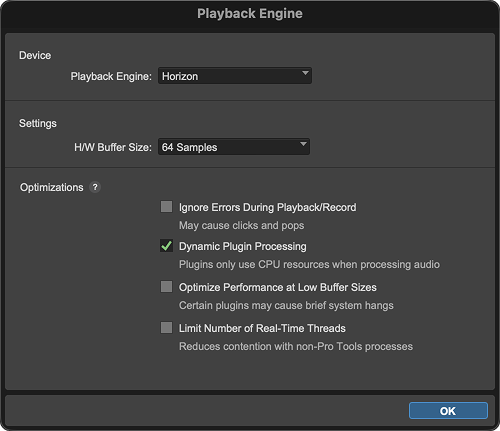
Selecting Horizon in your DAW
Open the DAW's audio or device settings and select the installed Horizon audio device/driver for both input and output as required by your session.
Sample rate
When Horizon is selected as the DAW audio device, changing the DAW session sample rate changes the Horizon system sample rate.
Horizon supports 44.1, 48, 88.2, 96, 176.4 and 192 kHz. The Horizon sample-rate setting is global across connected Horizon devices.
Digital clocking
When other digital equipment is connected, the complete digital system should use one clock master and matching sample rates.
If you hear clicks, pops or distortion, or a digital input does not lock, check the selected clock source, sample rate, optical/BNC cabling and the Horizon 16 front-panel Status view.
See Digital I/O & Clocking for ADAT channel counts, S/PDIF operation, word-clock setup and termination.
Monitoring while recording
The Horizon Mixer monitoring faders control the monitoring path rather than the recorded input level sent to the DAW. This allows the Main Mix and Independent Mixes to be adjusted for listening without changing the source level being recorded by the DAW.