Audio Loopback
iD4 MKII includes a software loopback mixer for routing audio from one application into another for recording or streaming.
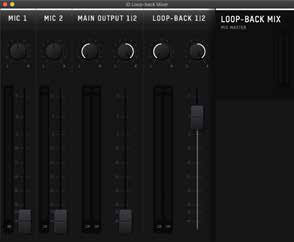
Loopback mixer
Loopback sources
Raise the required faders to create the stereo loopback mix.
- Mic 1 — signal from the rear mic input.
- Mic 2 — signal from the front instrument/DI input.
- Main Output 1/2 — the DAW playback feed sent to outputs 1+2.
- Loopback 1/2 — the dedicated DAW loopback playback pair, sent to outputs 3+4.
Current iD4 MKII firmware changed the loopback DAW feed to a pre-Monitor Mix point. The definition above therefore describes the DAW playback feed rather than implying that it follows the physical speaker/headphone monitor mix.
Record or stream the loopback mix
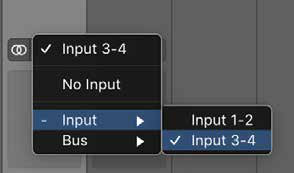
In the recording or streaming application, select either Input 3+4 or Loopback 1+2 as the stereo input. The exact input name depends on the application.
Send computer audio to Loopback 1/2
Where the source application lets you choose its output, route it to the iD4 MKII Loopback 1/2 playback pair.
macOS system audio
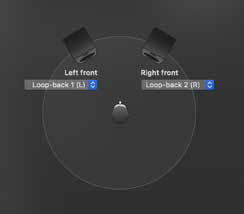
Open Audio MIDI Setup from Applications > Utilities, select iD4, open the output/speaker configuration and assign the system outputs to Loopback 1 and Loopback 2.
Windows system audio
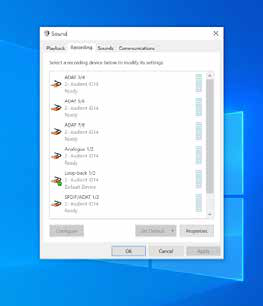
Open the Windows sound playback-device list and select Loopback 1+2 as the output device.
For application-specific output routing, refer to the documentation for the application being used.