Digital Outputs & Clocking
ASP880 outputs AES/S/PDIF and ADAT simultaneously at 44.1, 48, 88.2 or 96 kHz.
AES and S/PDIF
The rear-panel DB9 connector carries eight channels of transformer-balanced AES digital output. Leave the AES / S/PDIF switch out for professional AES operation.
Press the switch to change the DB9 output to consumer S/PDIF format, including its lower signal amplitude. The channel pinout is shown in the Block Diagram.
ADAT SMUX
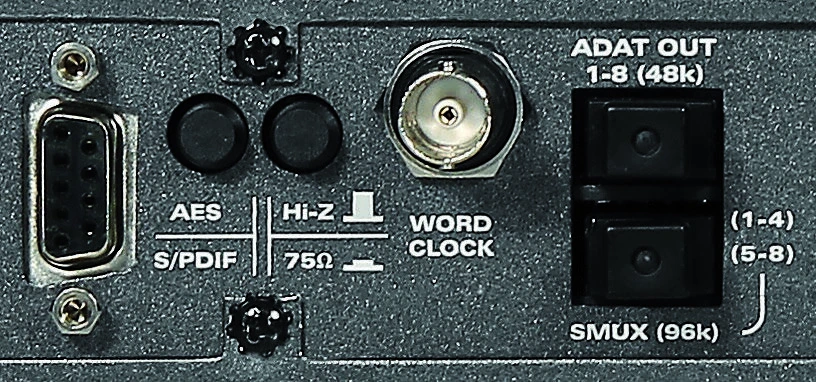
| Sample rate | Optical connection | Channels |
|---|---|---|
| 44.1 or 48 kHz | Top ADAT port | Channels 1–8 |
| 88.2 or 96 kHz | Both ADAT ports | Four channels on each port for channels 1–8 |
At 88.2 or 96 kHz, connect two optical cables for all eight channels.
ASP880 as clock master
- Connect the ASP880 AES/S/PDIF or ADAT output to the interface or recorder.
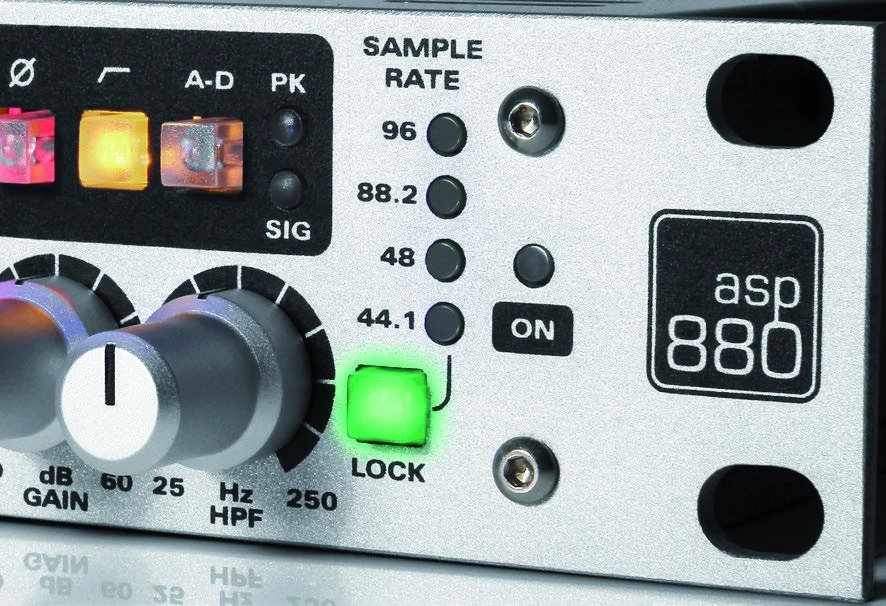
- Press SAMPLE RATE until the required sample rate is selected.
- Set the receiving interface, recorder and DAW session to the same sample rate.
- Set the receiving device’s clock source to its AES, S/PDIF or ADAT input as appropriate.
Both digital formats remain active simultaneously, so the second format can feed another recorder.
ASP880 as an external-clock slave
- Connect the master clock output to the ASP880 WORD CLOCK input using a 75 Ω BNC coaxial cable.
- Press SAMPLE RATE until the LOCK switch flashes green. This selects external-clock mode.
- When a valid clock is detected, the green indicator becomes solid.
- If ASP880 is the only or last device in the word-clock chain, engage the rear-panel 75 Ω termination switch.
- If a BNC T-connector is used to distribute clock, terminate only the final device in the chain at 75 Ω.

important
Use only one clock master in the system. Incorrect master/slave configuration, sample-rate mismatch, unsuitable cabling or incorrect termination can cause clicks, pops or failure to lock.