Safety and Compliance
Important safety instructions
The following safety instructions are based on the EVO SP8 V2.2 manual. Obvious spelling and typesetting errors have been corrected without changing the intended safety meaning.
- Read all safety and operating instructions before operating the product.
- Retain the safety and operating instructions for future reference.
- Heed all warnings on the product and in the operating instructions.
- Follow all operating and use instructions.
- Unplug the product from the wall outlet before cleaning. Do not use liquid or aerosol cleaners; use a dry cloth.
- Do not use attachments not recommended by the manufacturer.
- Do not use this product near water.
- Do not place the product on an unstable cart, stand, tripod, bracket or table. Any mounting should follow the manufacturer's instructions and use a recommended mounting accessory.
- Do not place naked flame sources, such as lighted candles, on the product.
- Do not block ventilation openings. Do not place the product in a built-in installation unless proper ventilation is provided or the manufacturer's instructions are followed.
- Operate the product only from the power source indicated on its marking label and connect it to a mains socket outlet with a protective earthing connection.
- Route power-supply cords so they are not likely to be walked on or pinched, particularly at plugs, receptacles and the point where they exit the product.
- Where the mains plug or appliance coupler is used as the disconnect device, it must remain readily operable.
- Unplug the product during lightning storms or when it will be unused for long periods.
- Do not overload wall outlets, extension cords or convenience receptacles.
- Never push objects into the product through openings and never spill liquid on the product.
- Refer servicing to qualified service personnel when the power cord or plug is damaged, liquid or objects enter the product, the product is exposed to rain or water, it does not operate normally, it is dropped or damaged, or it shows a distinct change in performance.
- Replacement parts must have the characteristics specified by the manufacturer.
- After servicing or repair, appropriate safety checks should be performed.
The source safety text also contains generic wording covering headphones, battery disposal, outside antennas and overhead power lines. Those statements remain a compliance-owner review item rather than being expanded or reinterpreted here.
Warning symbols
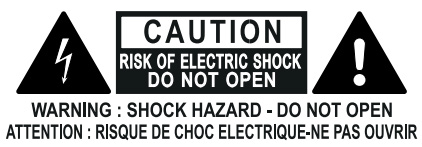
The lightning-flash symbol warns of uninsulated dangerous voltage within the product enclosure that may be sufficient to create a risk of electric shock. The exclamation-mark symbol identifies important operating and maintenance instructions accompanying the product.
Placement and ventilation
Keep the side air vents clear. The V2.2 safety section specifies the following minimum clearances around the unit:
- Left and right panels: 10 cm
- Rear panel: 10 cm
- Top panel: 10 cm
Do not install EVO SP8 near radiators, heat registers, stoves or other equipment that produces heat.
The V2.2 Rack Mounting section separately suggests one rack unit above and below EVO SP8 when it is installed near hot equipment. That wording does not match the 10 cm safety clearances above. The source discrepancy is under owner review and has not been editorially reconciled.
FCC compliance
EVO SP8 has been tested and found to comply with the limits for a Class B digital device, pursuant to Part 15 of the FCC Rules.
Operation is subject to the following two conditions: this device may not cause harmful interference, and it must accept any interference received, including interference that may cause undesired operation.
CE, UKCA, RoHS and Japan / PSE
The V2.2 declaration contains source-led conformity statements for CE, UKCA, RoHS and Japan/PSE, including the reference METI Ordinance Appendix 12 J55032(H29) and an IEC 62368 Test Report with Japan deviation.
The V2.2 ESD wording also refers to recovering the device by unplugging and reconnecting it to a host computer. Because EVO SP8's normal audio path is ADAT and its USB-C port is for firmware updates only, the applicability of that source wording remains under compliance review rather than being rewritten here.
For current compliance or safety clarification, contact Audient Support.