Digital I/O & Clocking
Clocking fundamentals
Digital audio devices must share a common timing reference to transfer audio correctly. One device provides the clock used by the rest of the connected digital system.
When connecting Horizon 8P to other digital audio equipment, configure the system so that one device provides the master clock and the other connected devices synchronise to it. In a multi-Horizon system, the Primary Horizon device uses its internal clock and secondary Horizon devices receive word clock from the Primary device.
Choosing a clock source
Horizon Control provides the following clock-source settings:

-
Internal — uses the Horizon device's internal clock.
-
Digital 1 — synchronises Horizon to the incoming digital signal on Digital 1.
-
Digital 2 — synchronises Horizon to the incoming digital signal on Digital 2.
-
External (Word Clock) — synchronises to an incoming word-clock source. In a multi-Horizon system, secondary devices receive word clock from the Primary device.
Matching sample rates
All devices in the digital audio system should operate at the same sample rate. The Horizon system uses one global sample-rate setting for connected Horizon devices.

An incorrect clock source or mismatched sample rate can cause clicks, pops or distortion.
Checking clock and digital input status

The Horizon 8P front-panel Status screen displays the current sample rate, digital input format and digital input clock status.
Horizon Control displays the current clock source and sample rate as system-status indicators. Double-click either indicator to open Hardware Settings.
Word clock termination

Horizon 8P provides switchable 75 Ω word clock termination from the front-panel Settings menu. The setting can be enabled or disabled from the Motion UI.
Word clock and multiple Horizon devices
Horizon 8P provides word clock input and output. When Horizon devices are daisy-chained over Thunderbolt, the Primary device supplies word clock to the secondary devices so that the connected Horizon hardware remains synchronised.
Using an external word-clock master
When the Horizon system is following an external BNC word-clock source:
- Connect the external clock source to the Horizon word-clock input.
- Select External (Word Clock) in Hardware Settings.
- Make sure the external source and Horizon use the same sample rate.
- Check the Horizon 8P Status view to confirm that the expected sample rate and digital clock state are shown.
Digital I/O
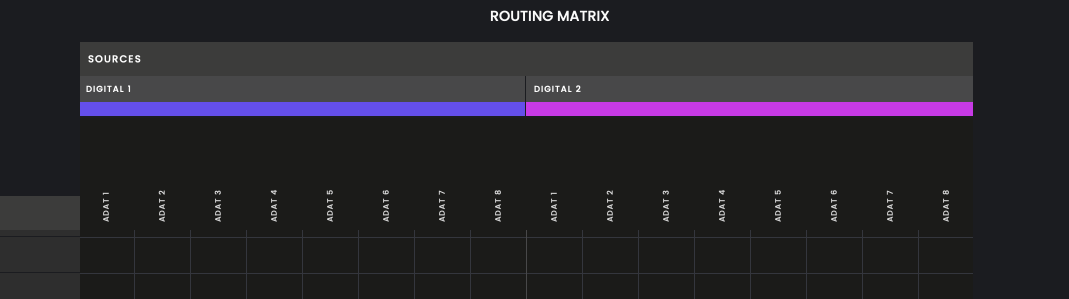
Horizon 8P provides two optical digital inputs and two optical digital outputs. The Digital Mode setting selects ADAT or S/PDIF operation for the selected Horizon device.
ADAT channel counts
Horizon 8P provides the following ADAT channel counts for each input or output direction:
| Sample rate | Digital 1 | Digital 2 | Total channels per direction |
|---|---|---|---|
| 48 kHz | 8 channels | 8 channels | 16 channels |
| 96 kHz | 4 channels | 4 channels | 8 channels |
| 192 kHz | 2 channels | 2 channels | 4 channels |
At higher sample rates, the first channels of each digital port remain available while the later channels become unavailable. For example, at 96 kHz, channels 1–4 of each digital port remain available.
S/PDIF mode
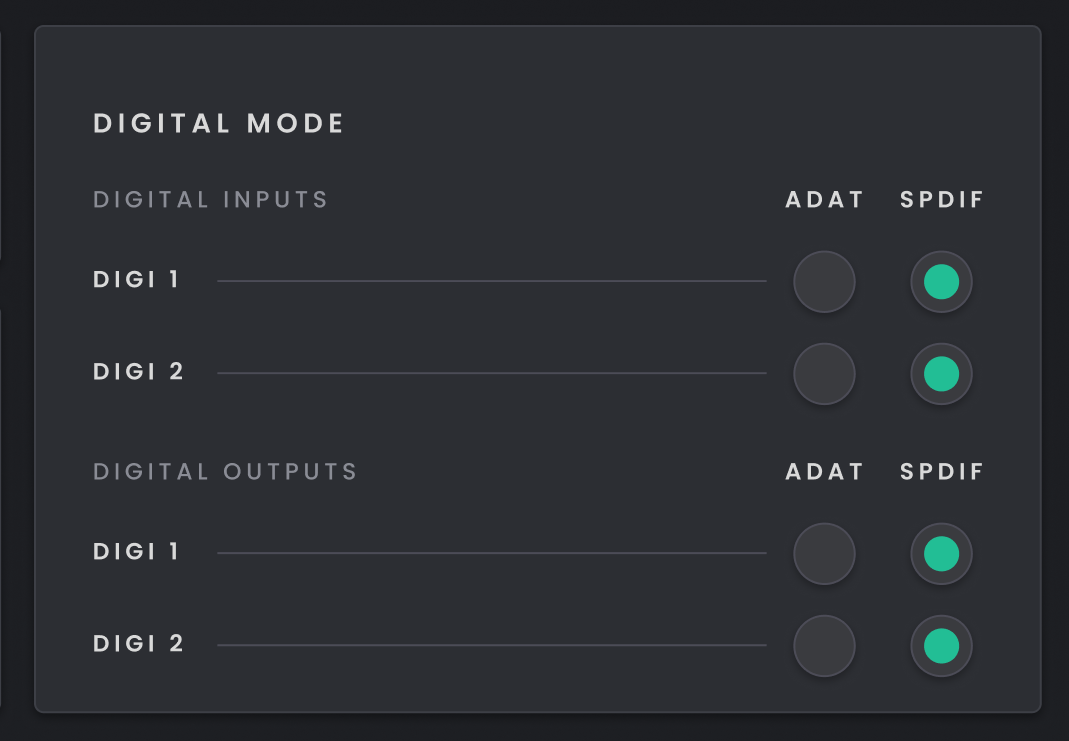
When S/PDIF mode is selected, digital inputs and outputs 1–2 are shown and the Routing Matrix updates to reflect the selected mode.
S/PDIF supports sample rates up to 96 kHz.
Sample rates
Horizon supports the following sample rates:
-
44.1 kHz
-
48 kHz
-
88.2 kHz
-
96 kHz
-
176.4 kHz
-
192 kHz
The selected sample rate applies globally to all Horizon devices in the daisy chain.