Software Mixer
The iD Software Mixer provides low-latency monitoring, cue mixing and monitor control for iD48.
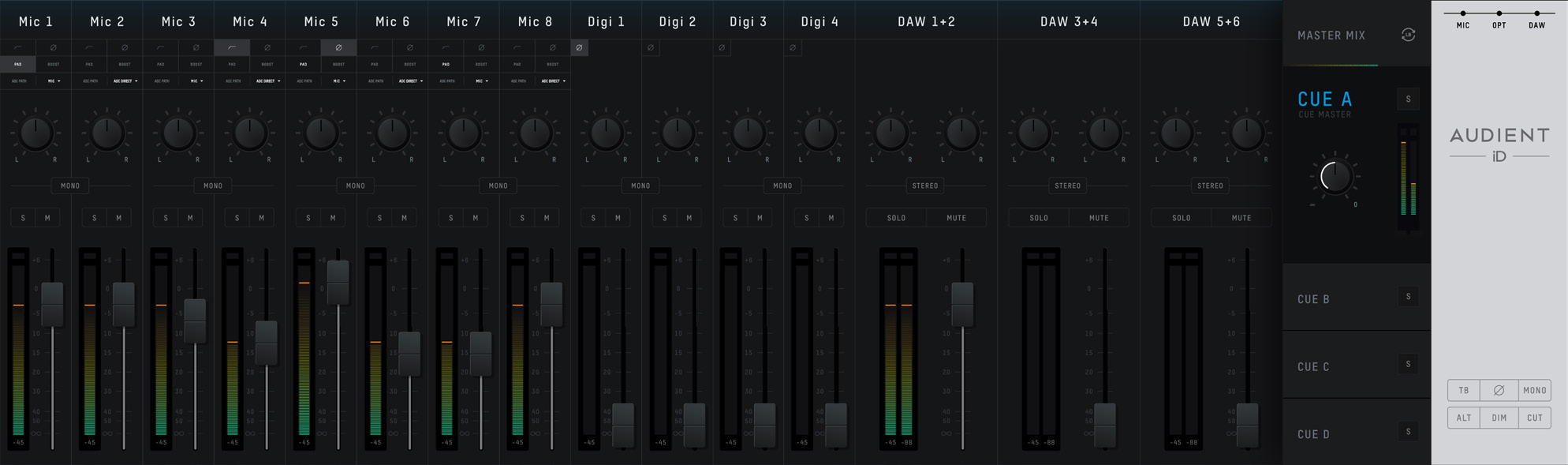
The mixer faders, pans, solos, mutes and cue-mix levels control monitoring and do not change the raw level recorded in your DAW. Input-path controls can affect the recorded signal. In particular, the hardware HPF and Pad, ADC Path selection, polarity control and the +10 dB digital Boost are applied in the input path; the +10 dB Boost also changes the level sent to the DAW.
Channel types
The mixer contains three types of input channel:
- Mic Inputs - the eight analogue input channels.
- Digital Inputs - channels received from the two optical inputs. The number available depends on whether each optical port is set to ADAT or S/PDIF and on the sample rate.
- DAW Returns - ten DAW Return channels from the computer for monitor mixes, cue mixes and outboard routing.
Use these channels to build the Main Mix and up to four Cue mixes.
Input channel controls
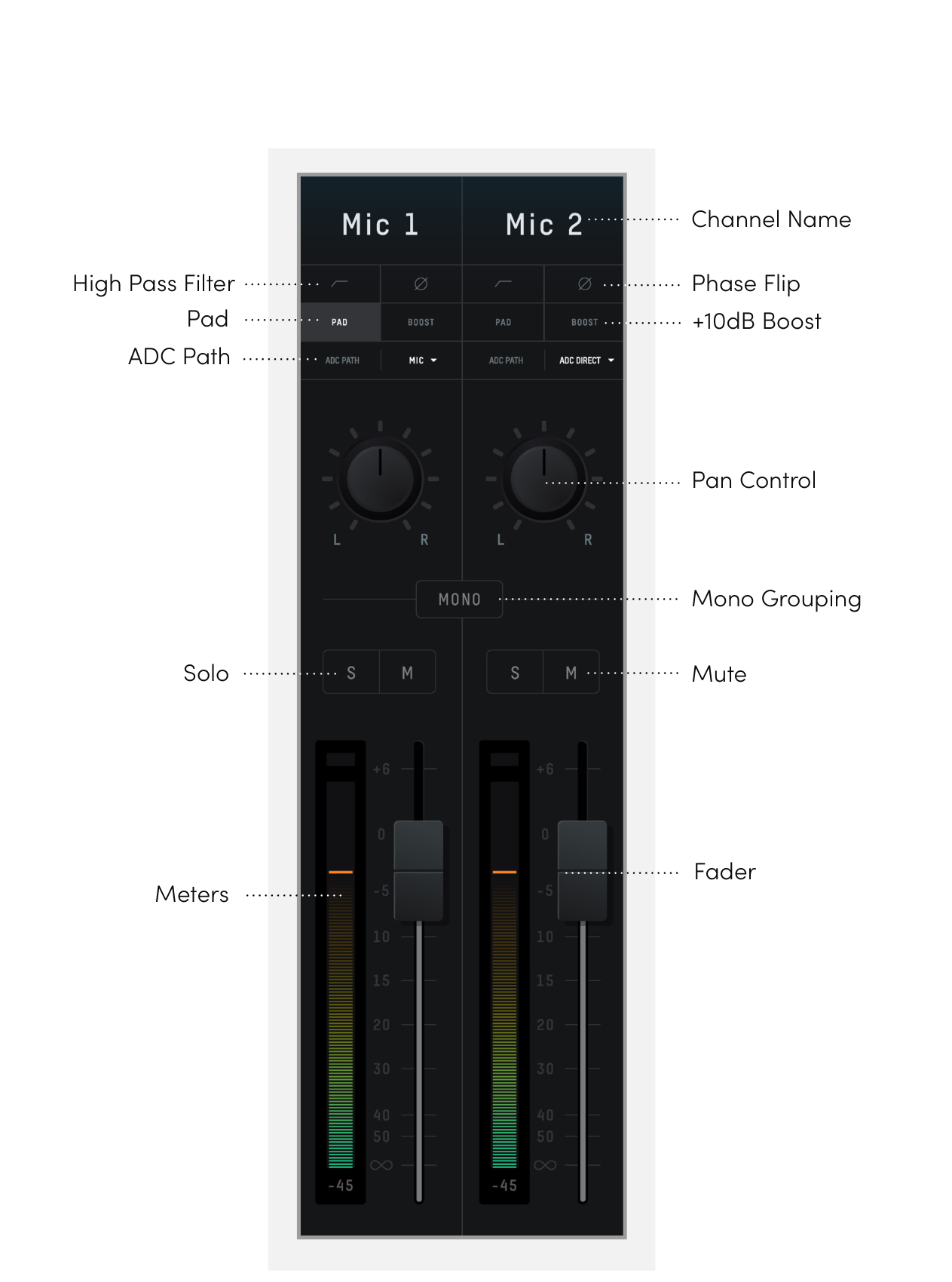
Channel name
Double-click a channel name to rename it, for example Kick, Snare or Vocal.
Input controls
The analogue input channels provide these controls in the iD Software Mixer:
- HPF - switches the channel's analogue 100 Hz high-pass filter on or off.
- Polarity - inverts the signal polarity. This can help when combining microphones that capture the same source from opposite directions or positions.
- Pad - engages the channel's analogue -10 dB pad for high-level sources.
- Boost - applies +10 dB of digital gain. This also affects the signal sent to the DAW.
- ADC Path - chooses Mic, ADC Direct or Mic Insert. See Inputs and ADC Paths.
Pan
Sets the channel position in the selected Main or Cue mix.
Stereo grouping
Groups two adjacent channels into a stereo channel controlled by one fader. The two pan controls are automatically set hard left and hard right.
Solo
Solos the selected channel in the current mix. Multiple channels can be soloed together.
Mute
Mutes the selected channel in the current mix.
Fader
Sets the channel level in the selected mix from -infinity dB to +6 dB.
Meter
Shows the channel level in dBFS. A red peak indication shows that the signal has reached/exceeded full scale. Click a peak indicator to clear it; use Alt + Click to clear all peak indicators.
Master section
Mix selection
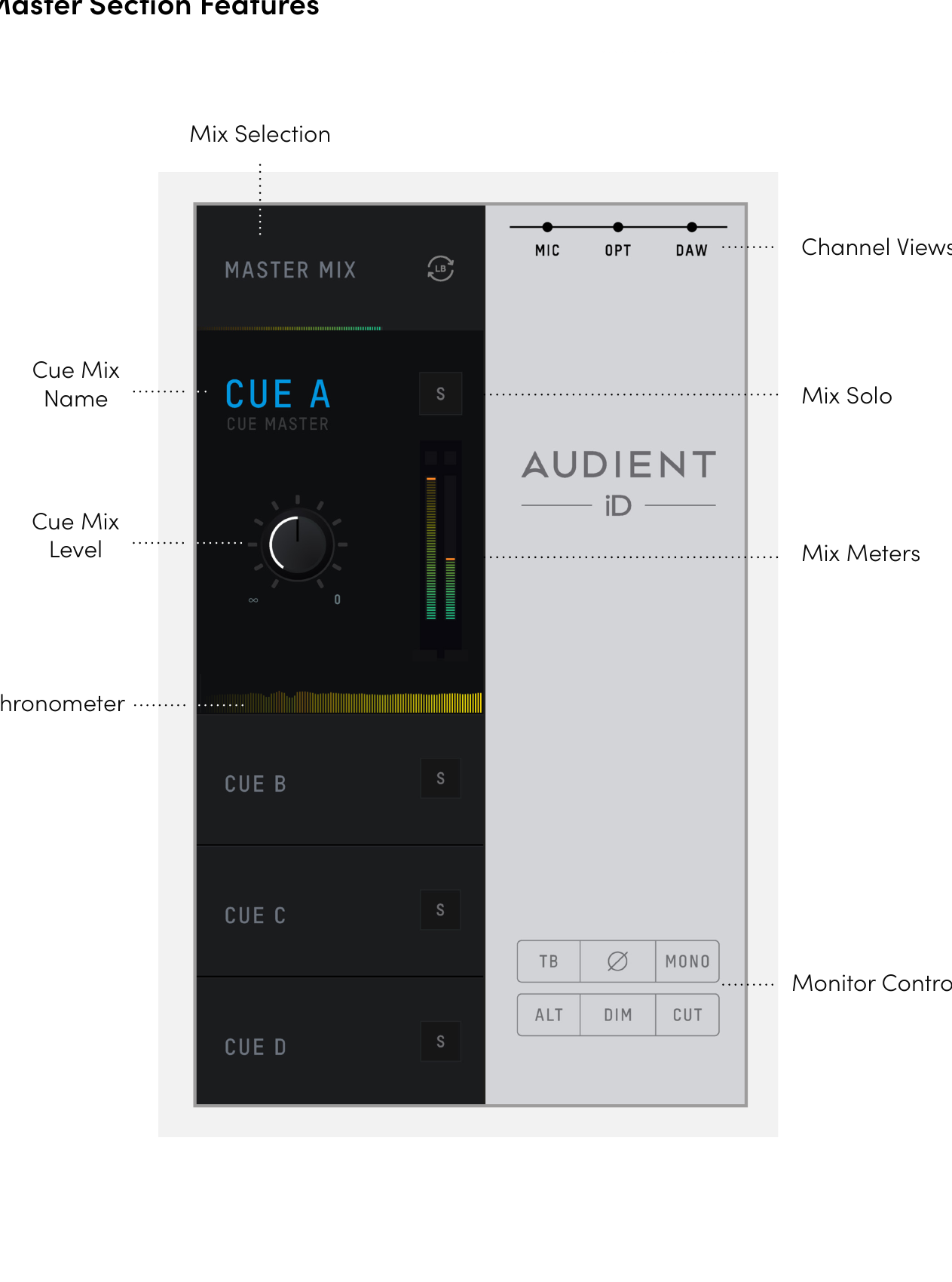
Select Main Mix or one of the four Cue tabs to edit that mix.
Cue mix name
Double-click a Cue name to give it a useful label, such as Drummer or Vocalist.
Mix Solo
Use Mix Solo to audition a Cue mix through the monitor path while working from the control room.
Mix level and meters
The Cue master level sets the overall level sent by that Cue mix. The adjacent meters display the master signal level for the selected mix.
Chronometer
The Chronometer is a recent level-history display. It shows the current level together with the level from the preceding few seconds, which can help identify a brief transient or see how a mix level changes over time.
Channel views
Use the channel-view buttons to show or hide the Mic, Digital and DAW Return channel groups.
Monitor controls
The master section provides these monitor controls:
- TB (Talkback) - switches talkback on/off for the Cue mixes. See System Panel, Routing and Talkback.
- Polarity / side audition - inverts one side of the monitor signal and engages Mono, cancelling common centre information so side/panned content can be auditioned.
- Mono - sums the stereo monitor signal to mono. The System Panel determines whether the mono signal is sent to the left, right or both speakers.
- ALT - switches from the Main monitor path to the configured Alt speaker path.
- DIM - attenuates the monitor path by the amount set in the System Panel.
- CUT - mutes the Main monitor signal.
Assign F1 and F2
The two hardware Function keys can be assigned to the current iD48 monitor functions documented for F-key assignment: Mono, Polarity, DIM or CUT.
Right-click the required monitor control in the iD Software Mixer and choose F1 or F2.
Continue to System Panel, Routing and Talkback.