Room Setup and Calibration
ASP510 can manage both monitoring and record functions in a surround system. Correct monitor calibration is important for consistent level and imaging.
Operating level
ASP510 can deliver up to +24 dBu at its outputs, while many power amplifiers and active monitors require lower levels.
When setting amplifier or active-monitor gain, consider the normal operating position of the ASP510 Volume control. The control law is designed to provide its finest working resolution between approximately 12 o'clock and 5 o'clock.
Use the Dim control when a lower monitoring level is required.
Calibrating the monitor channels
ASP510 includes a built-in pink noise generator.
- Place an SPL meter at the listening position.
- Hold Cut and Dim together until both buttons flash, then release them.
- ASP510 cuts all monitor outputs.
- Unmute one speaker at a time.
- Measure each of the five full-range channels at the listening position.
- Adjust the front-panel Monitor Trim for each channel until the five monitors produce the same SPL.
- Exit the calibration state when alignment is complete.
The front-panel Monitor Trim controls provide ±10 dB adjustment for each speaker output.
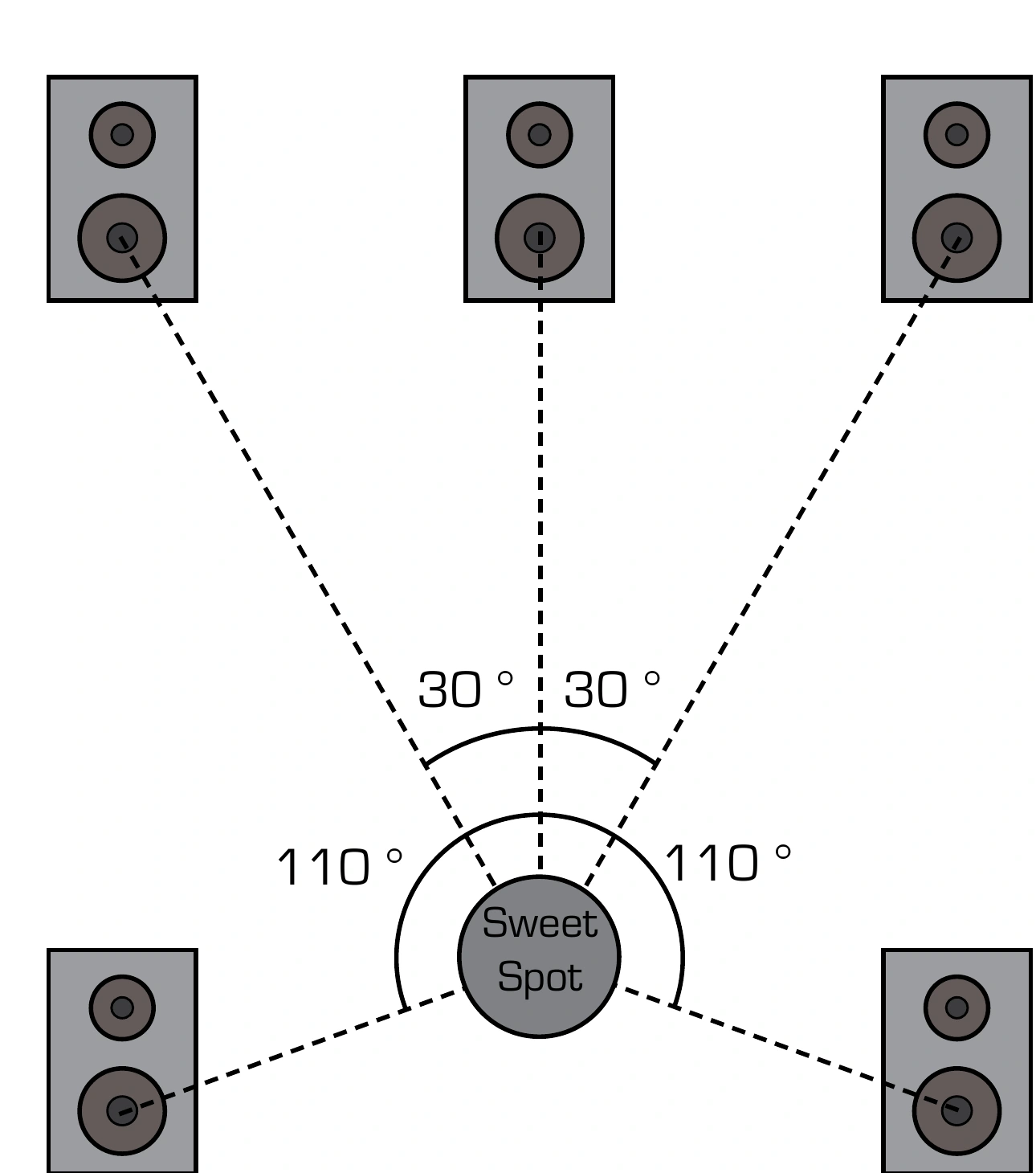
5.1 speaker placement
The source layout places Left and Right approximately 30° from the centre line and the surround speakers approximately 110° from the listening position.
Next steps
Continue to Rack Processor Controls.