Path Swapping, Track Bouncing and Solo
Path swapping
The FLIP switch is at the input of both paths and determines whether the MIC/LINE or the TAPE input is used for a particular path. The normal position for all switches on the console is UP. With FLIP in this position, the TAPE signal is routed through the LF path and the MIC/LINE input through the SF path. Pressing FLIP reverses this situation.
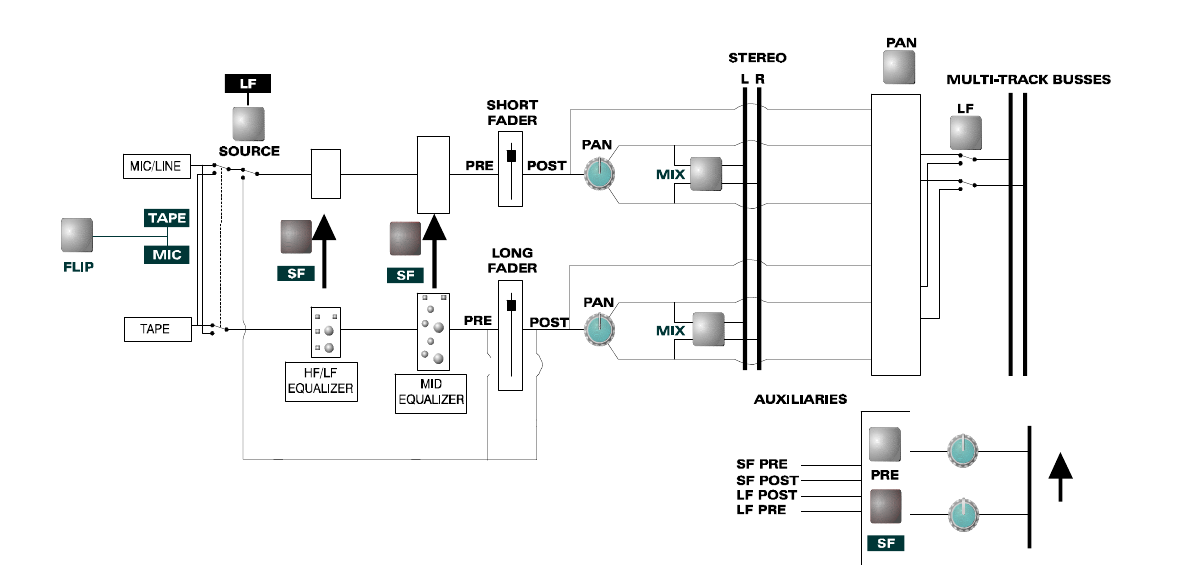
There are switches labelled SF associated with both the HF/LF equaliser and the MID equaliser. In their normal UP position, the equalisers are in the LF path. Pressing the SF switches moves the equaliser sections into the SF path. The entire equaliser can therefore be in either the LF or SF path, or one section can be in each path.
If multi-track recordings are to be made with equalisation, the equalisers should be placed in the SF path. In that situation the effect of the equalisation will be heard and recorded. When the equaliser is in the LF path, its changes will be heard but will not be recorded on the multi-track recorder; they will be present on a stereo recording made during mixdown.
The auxiliaries can also be sourced from the SF path by pressing the SF switch associated with each pair of auxiliaries. The auxiliaries can be selected pre or post fader for whichever path they are in.
Track bouncing
Track bouncing mixes a limited number of tracks together and rerecords them. This may free tracks on the tape recorder for additional material or simplify the final mix by premixing groups of instruments. During mixdown, a similar result can be obtained with the subgroup facility.
Signal coming off tape normally travels through the LF path. To rerecord it, the signal must be routed to the routing matrix and assigned to the destination recording track. Rather than use FLIP and replicate panning and EQ in the SF path, use the LF button next to the routing matrix. This selects the output of the long fader to the routing matrix and preserves panning and EQ.
Ensure that all tracks to be bounced are unrouted from the mix. The result can be heard by assigning the destination track's LF path to the mix.
Solo
Pressing a solo button on a channel with either PFL or AFL selected allows the PFL or AFL signal for that channel to be heard on the monitors and viewed on the stereo output meters.
The SOLO-IN-FRONT control adjusts the relative level of the solo'd signal and the stereo mix, making it possible to hear a channel in isolation or with some amount of the mix behind it.
Solo-in-Place is an extension of the AFL and PFL facilities. If SIP is selected on the master module, the signal on the main stereo bus is replaced by the AFL (post-pan) signal of the soloed channel. This is equivalent to cutting all other channels except the one being checked.
If you are recording when Solo in Place is used, this will be recorded.
For this reason the SIP switch is illuminated. The manual suggests its most likely use is just before a mix, when equalisation is being set up. It is often easier to adjust equalisation on a soloed channel, but it is essential to check how the result sounds in the mix.