Equaliser, Short Fader, Flip and Long Fader
Equaliser
The equaliser is normally associated with the LF signal path. It is split into two sections - one for high and low frequencies (HF/LF) and the other for middle frequencies (MIDS). Both sections can be switched in and out independently and switched into the SF signal path independently.
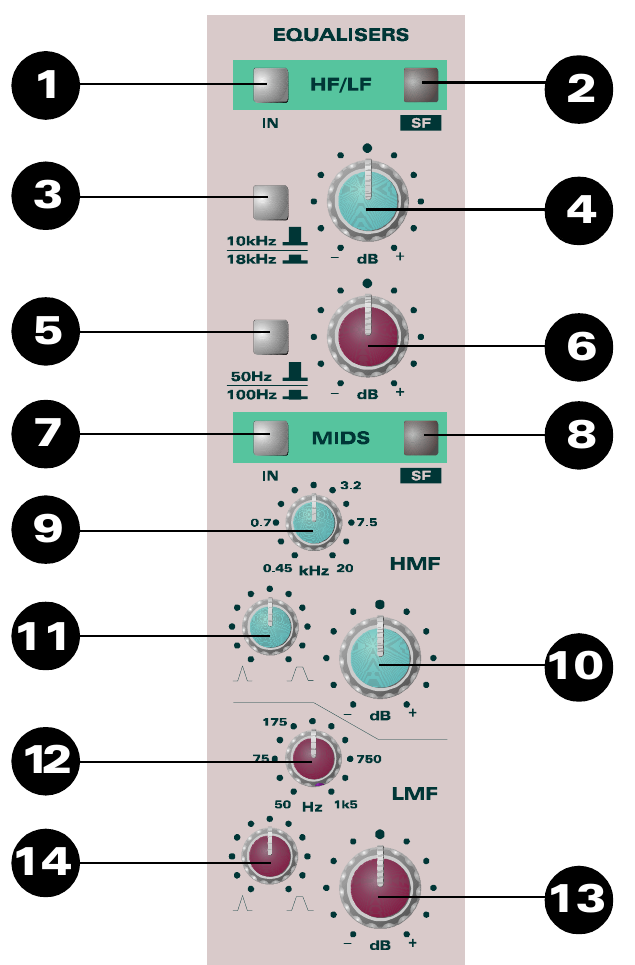
The HF section has a boost/cut range of 15 dB. The frequency can be switched between 10 kHz with the switch up and 18 kHz with the switch depressed.
The LF section has a boost/cut range of 15 dB and a shelving characteristic. The frequency can be switched between 50 Hz with the switch up and 100 Hz with the switch depressed.
The high-mid section (HMF) has three controls. The boost/cut range is 15 dB and the centre frequency can be varied from 450 Hz to 20 kHz. A Q control varies the bandwidth from a sharp, narrow characteristic to a gentler, wider characteristic.
The low-mid section (LMF) is a peaking mid band with three controls. The boost/cut range is 15 dB and the centre frequency can be varied from 50 Hz to 1.5 kHz. A Q control varies the bandwidth from a sharp, narrow characteristic to a gentler, wider characteristic.
The stated Q range is 3.8 (0.4 octave) to 0.65 (2 octaves).
Equaliser controls
- HF/LF Section places the HF/LF equaliser in circuit.
- SF places the HF/LF equaliser in the SF signal path, where it can treat a signal before recording.
- 10 kHz / 18 kHz selects the HF equaliser frequency.
- HF boost/cut control.
- 50 Hz / 100 Hz selects the LF equaliser frequency.
- LF boost/cut control.
- MIDS Section places the MIDS equaliser in circuit.
- SF places the MIDS equaliser in the SF signal path, where it can treat a signal before recording.
- HMF centre FREQUENCY.
- HIGH MID boost/cut.
- HIGH MID Q.
- LMF centre FREQUENCY.
- LOW MID boost/cut.
- LOW MID Q.
Short Fader (SF)
There are three back-illuminated indicators showing the selected input to the SF path. This can be changed between Mic/Line and Tape using the FLIP switch.
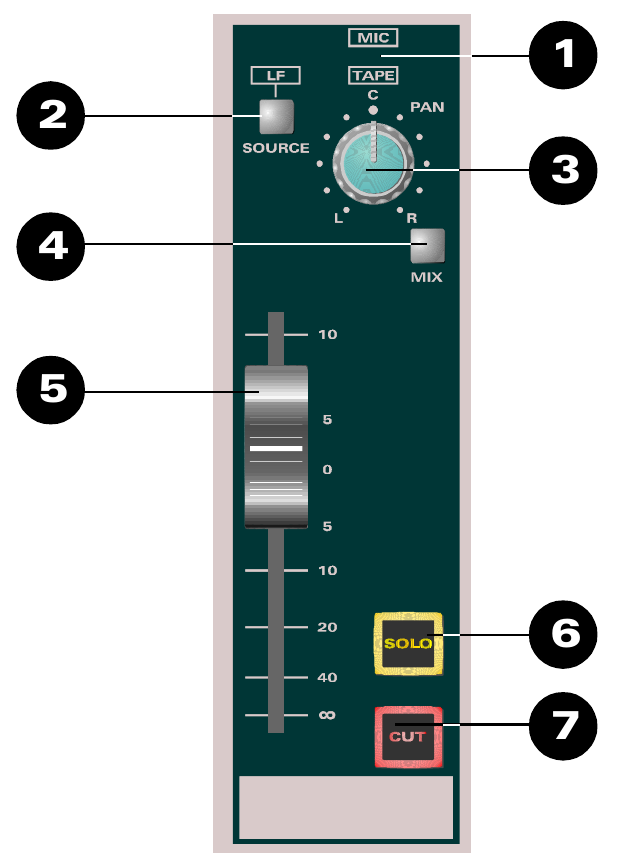
LF Source allows the SF path to take its source from the LF path. During mixdown this can be used to send the LF signal through the SF path to the routing matrix, allowing the group outputs to be used as additional effect sends.
Normally the LF Source signal is derived after the long fader (POST LF), but it can be made PRE LF by changing an internal link on the circuit board.
The source switching occurs before the equaliser. This means the LF signal routed into the SF path can be equalised by switching either or both equaliser sections into the SF path. When an equaliser section is switched to SF, that section is no longer available in the LF path.
The SF PAN control allows panning across the group outputs when PAN is selected in the routing section. MIX routes the SF signal to the stereo mix bus and allows the SF path to be used as an additional input during mixdown. The short fader provides 10 dB of gain in hand. SOLO accesses the AFL/PFL or Solo in Place facilities, and CUT mutes the SF path.
For the lowest practical mix-bus noise, unroute SF paths from MIX when they are not required. Muting an unused SF path with CUT can also remove its noise contribution from the mix.
Short Fader controls
- MIC/TAPE back-lit source indicators show whether MIC/LINE or TAPE is selected to the SF path.
- SOURCE selects the post-fade LF signal as the input to the SF path, overriding the MIC/TAPE selection from FLIP. An internal link can change this source to pre-fade. When SOURCE is selected, the LF legend illuminates and the MIC/TAPE indicator is blanked.
- SF PAN pans the SF signal across odd and even groups.
- MIX routes the SF signal to the stereo mix bus.
- SHORT FADER controls the SF signal level.
- SOLO allows the SF signal to be heard on the monitors and viewed on the master meters. With Solo in Place selected, the soloed signal replaces the console output.
- CUT mutes the SF signal path.
Flip and Pan
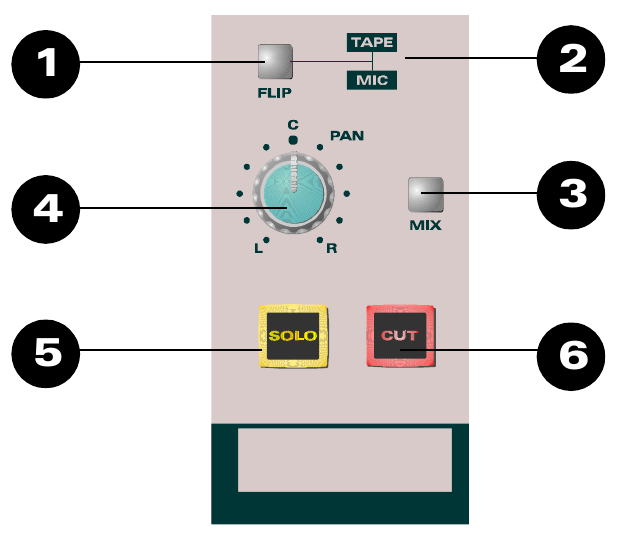
The FLIP switch reverses the MIC/LINE and TAPE inputs between the two signal paths. Normally TAPE feeds LF and MIC/LINE feeds SF; with FLIP pressed, TAPE feeds SF and MIC/LINE feeds LF. Illuminated indicators show the selected source in each section.
The PAN control pans the LF signal across the stereo mix bus and MIX assigns the LF signal to the stereo bus. SOLO accesses the AFL/PFL or Solo in Place facilities. CUT mutes the LF signal path.
Normally MIX will be selected for LF channels that are contributing to the stereo mix. Unroute LF channels from MIX when they are not required to reduce mix-amplifier noise. Muting an unused LF path with CUT can also reduce its noise contribution.
Flip and Pan controls
- FLIP swaps the inputs between the LF and SF paths.
- MIC/LINE and TAPE indicators show which input is selected to the LF path.
- MIX routes the LF signal to the stereo mix bus.
- PAN pans the LF signal across the stereo bus.
- SOLO allows the LF signal to be heard on the monitors and viewed on the master meters. With Solo in Place selected, the soloed signal replaces the console output.
- CUT mutes the LF signal path.
See Long Fader (LF) for the fader used to control the level of the LF signal path.
Long Fader (LF)
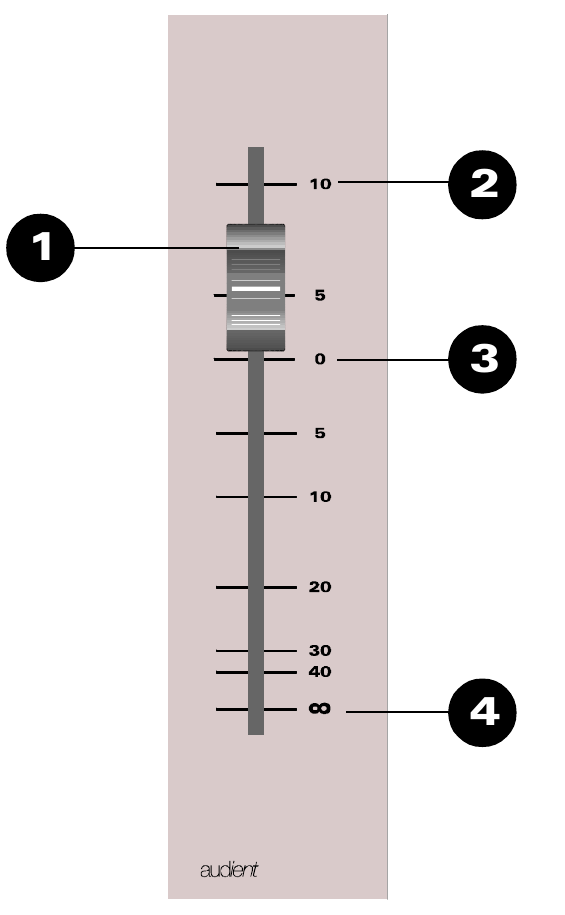
Located close to the operator, the Long Fader operates on the LF signal path and is mainly used for creating the monitor mix and final stereo mix. The fader is expected to operate around the 0 dB mark with 10 dB of gain in hand, allowing the signal to be increased or decreased in level.
When level setting, start with the fader at 0 dB and then adjust the input-sensitivity control for the correct level to optimise the gain structure.
- LONG FADER controls the LF signal level.
- +10 dB mark - the fader is fully open at this point, introducing 10 dB of gain into the signal path.
- 0 dB mark - the normal operating position.
- At the bottom of the fader travel, the signal path is closed and no signal will pass.