Console Functions and Input Pod
Now that an understanding of the use of the console has been gained by example, the manual moves into a reference section listing the functions on the modules. The modules are sectioned so they can be shown at a reasonable size and the controls are identified by number. A brief functional description is given with each drawing while the broader text explains the function. This part of the web manual follows the same reference approach.
The console-function pages identify controls by number and use the surface colouring to distinguish the two signal paths. Light-background controls are associated with the LF path and dark-background controls with the SF path.
Input pod
The input pod is the gateway to the remainder of the signal processing of the console. There are three inputs: a mutually exclusive microphone and line input, and a tape input.
The mic/line input normally sends signal to the SF or short-fader signal path while the tape input normally sends signal through the LF or long-fader path, unless this is reversed by the FLIP switch.
There are two meters associated with the inputs: a 20-segment 0dBFS peak-reading meter showing the tape-input signal and a 3-segment peak-reading meter giving an indication of the mic/line level. Both the MIC/LINE and TAPE inputs have insert points which can be switched in and out of circuit.
The Mic Input has a gain-control range of +6 dB to +60 dB and the Line Input has a range of -14 dB to +20 dB. Switches provide Phantom Power, Polarity Reversal and High Pass filtering. The TAPE input has a trim-control range of ±15 dB.
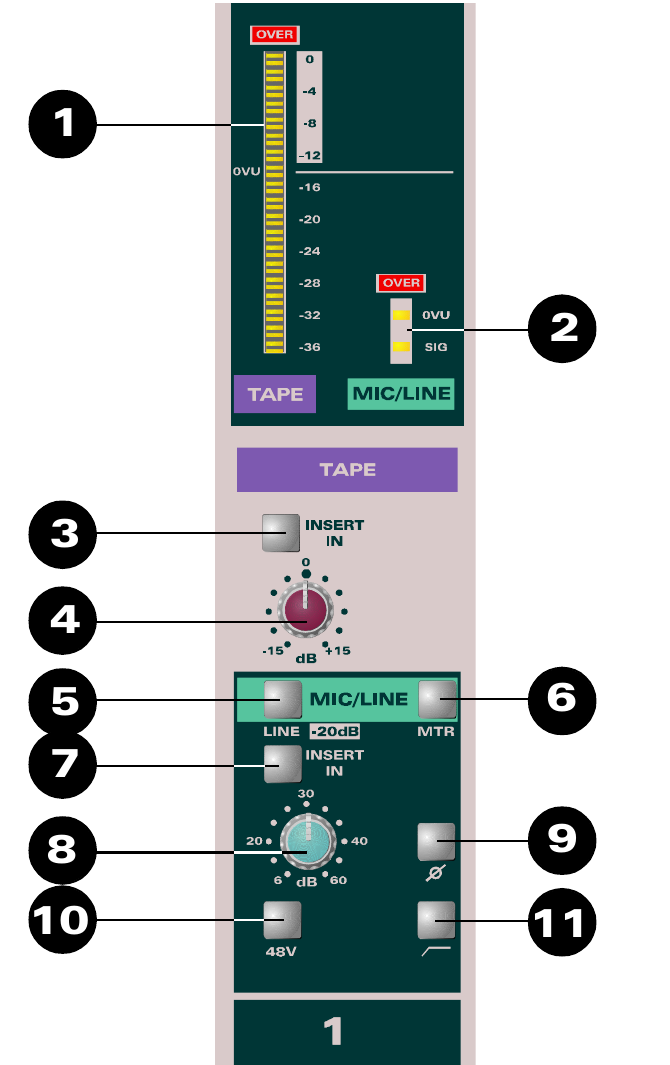
Controls
- 20 Segment meter.
- 3 Segment meter.
- INSERT IN places an insert point in the TAPE path.
- Tape Input TRIM control.
- MIC/LINE switch - press down to select the line input.
- MTR - press to show the mic/line input on the large meter and the tape input on the small meter.
- INSERT IN places an insert point in the MIC/LINE path.
- Mic/Line GAIN control.
- Polarity (Phase) Reverse switch.
- 48V Phantom Power switch. Turn the loudspeakers down before switching this on or off.
- High Pass Filter switch, intended to remove unwanted low frequencies such as air-conditioning rumble.
A back-illuminated number at the bottom of the pod provides channel identification.