Recording and In-Line Architecture
Recording with the ASP8024
In-line architecture
ASP8024 has an in-line architecture. This means that the channel path and the monitor path are both included in the same physical strip.
Because the two signal paths are integrated in this way, in-line consoles have sometimes been seen as confusing. Great care has been taken in the cosmetic and ergonomic design of the ASP8024 to make the two paths easily distinguishable from one another.
Dark areas of the control surface and dark switch buttons are associated with the short fader (SF) or channel path, while light areas of the control surface are associated with the long fader (LF) or monitoring path. For the remainder of this manual the signal paths are referred to as the LF and SF paths.
As a default condition the Mic/Line input feeds the SF path while the Tape return signal uses the LF path. This assignment can be reversed using the FLIP switch. Back-lit legends indicate the signal source for each path.
The recording process
Recording is generally a two-stage process, unless you are making a classical recording where very simple microphone configurations are often used to record straight down to stereo. Popular music is usually tracked first to get all the instruments onto a storage medium - usually a multi-track tape recorder. The second stage involves returning the recorded tracks back into the console to combine them into a stereo mix.
When instruments are under MIDI control it is not necessary to record them, as they can be played live into the mix when required. If a mix has many MIDI-controlled instruments then much of the tracking stage can be eliminated.
Basic tracking
The group outputs feed the inputs to the different tracks of the recorder while the recorder outputs are connected to the tape inputs on the console.
The FLIP switch should be in the UP position. This ensures that the microphone or line inputs travel through the SF path to the tape recorder while the tape returns travel through the LF path to the stereo mix bus.
A guide track is often recorded first. This could be anything from a click track to a drum kit to some very raw vocals - anything that subsequent recordings can be based on. The guide track will then most likely be destroyed.
Having established a guide track it is important to be able to hear it so that subsequent tracks can be laid down in time with it. The guide track can be played through the LF path and used as a source for AUXILIARY A. Switch the auxiliary to PRE and ensure that it is selected for use with the LF path. On the master section, AUXILIARY A can then be selected as the source for FOLDBACK A. The FOLDBACK A output should be connected to a headphone amplifier.
The performer input is connected to a MIC input on a console channel and sent through the SF path to the routing matrix. Select the group/track that corresponds to the track put into REC-READY on the recorder.
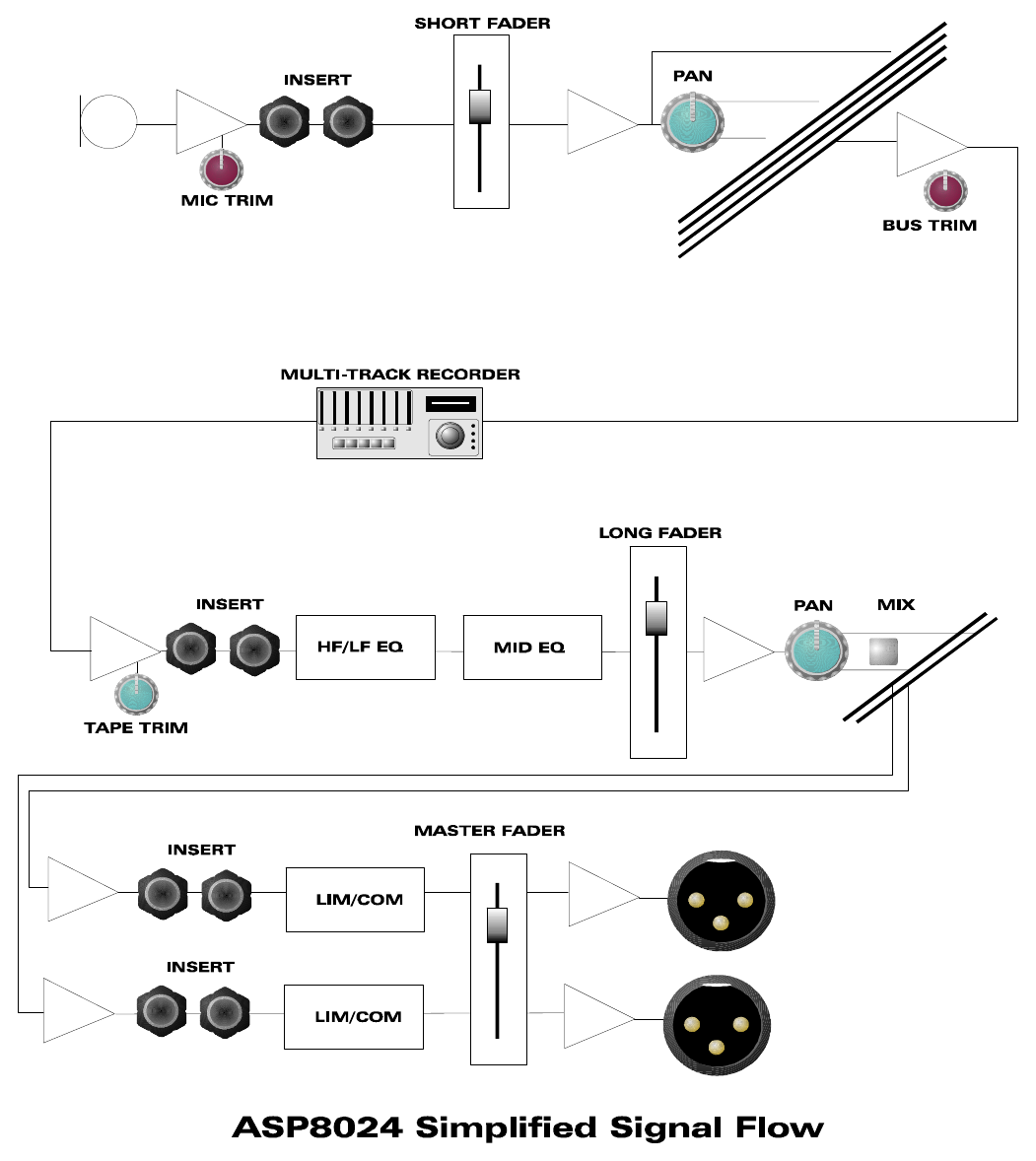
With the tape recorder in record, the performance is recorded. Subsequent instruments can be added in the same fashion. Previously recorded material can be played back through the console and added to the auxiliary/foldback mix for the next performer.
At this point a rough mix can start to be considered. Opening the long faders corresponding to recorded tracks allows them to be heard on the mix output of the console, provided MIX is pressed on the relevant channels and MIX is selected as the control-room loudspeaker source. Keeping the auxiliaries pre-fade allows the stereo mix to be adjusted without changing the studio foldback.
As the tracks are assembled, effects can be added. The auxiliary outputs can feed effects units, and the outputs of the effects units can be brought back through the RETURNS in the master section. The Foldback 1 or 2 controls on the RETURNS can route those effects into foldback.
Basic mixing
The mix has largely been created as a result of the tracking process. Additional instruments can be connected into remaining tape inputs, or the MIC/LINE inputs can be used if all tape inputs are occupied or the tape-input sensitivity is insufficient.
A signal using the SF path can be switched onto the stereo mix bus. Alternatively, the FLIP switch can enable the MIC/LINE input to feed the LF path if it is not in use. The equaliser, or part of it, and the auxiliaries can also be switched over to the SF path.
A compressor is available on the mix output where it is desirable to decrease the dynamic range of the mixed signal. The mix output also has an insert point where an external equaliser, compressor or other effect unit can be used.
Insert points
Both the SF signal path and the LF signal path have insert points. The Mic/Line signal-path insert point is located immediately after the Phase Reverse circuit and just before the Flip switch. The Tape signal-path insert point is located immediately after the tape input and again just before the Flip switch.
Insert points have a send and a return. The returns are fully balanced while the sends are ground sensing, allowing them to be connected to balanced or unbalanced loads. If an insert point is not required and is switched out of circuit, the send still carries signal, providing an additional output per insert point.
If an insert point is switched in and nothing is plugged into the RETURN jack, signal will still pass through because the jack has switching contacts which can only be broken by insertion of a jack plug.
The insert points use TRS jacks. The Tip is equivalent to pin 2 of an XLR connector, the Ring is equivalent to pin 3, and the Sleeve is ground, equivalent to pin 1.
Doing it live
With equipment capable of being played via MIDI, the tracking stage can be eliminated and a live mix created straight away. Both LF and SF signal paths can be routed to the stereo mix, giving up to 72 channels to mix with.
The group outputs can also be used as extra effect sends from either the LF or SF signal path. Resources can be assigned to the SF path using the SF switches; on a module-by-module basis a resource used in one path cannot be used by the other path.
If signals from different paths on the same module need to feed the same effect unit, the LINK switches associated with the auxiliary master controls provide a way to combine the auxiliary signals.