Monitoring and Master Section
Studio speakers and foldback
This part of the master module looks after the Studio Loudspeaker and Foldback outputs. The same sources are available in each case: TAPE 1, TAPE 2, CONTROL ROOM (C/RM), AUXILIARY A and AUXILIARY B.
TAPE 1 and TAPE 2 are external inputs to the console, typically used for a stereo recorder or another line-level playback source. C/RM selects the control-room monitor output as the source. This can be used to play the MIX to the studio loudspeakers or to create a quick foldback mix, with AUX A and AUX B added as required.
AUX A and AUX B are mono sources which can be independently selected to the left and right sides of the Studio Loudspeaker or Foldback outputs.
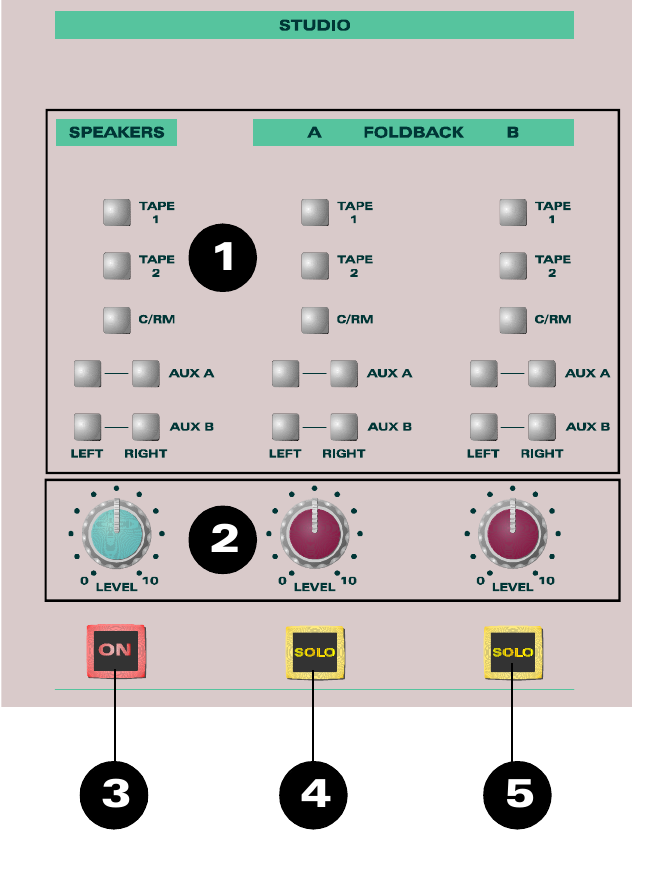
Each output has its own level control. The Studio Loudspeaker has an ON switch. The two Foldback outputs have SOLO switches so their mixes can be checked on the control-room monitors; Foldback SOLO is always AFL.
- SOURCE SELECT — selects the signals sent to the Studio Loudspeaker and Foldback outputs.
- LEVEL — sets the Studio Loudspeaker and Foldback output levels.
- Studio Loudspeaker ON — activates the Studio Loudspeaker output.
- FOLDBACK 1 SOLO — auditions Foldback 1 on the control-room monitoring system.
- FOLDBACK 2 SOLO — auditions Foldback 2 on the control-room monitoring system.
Control room monitoring
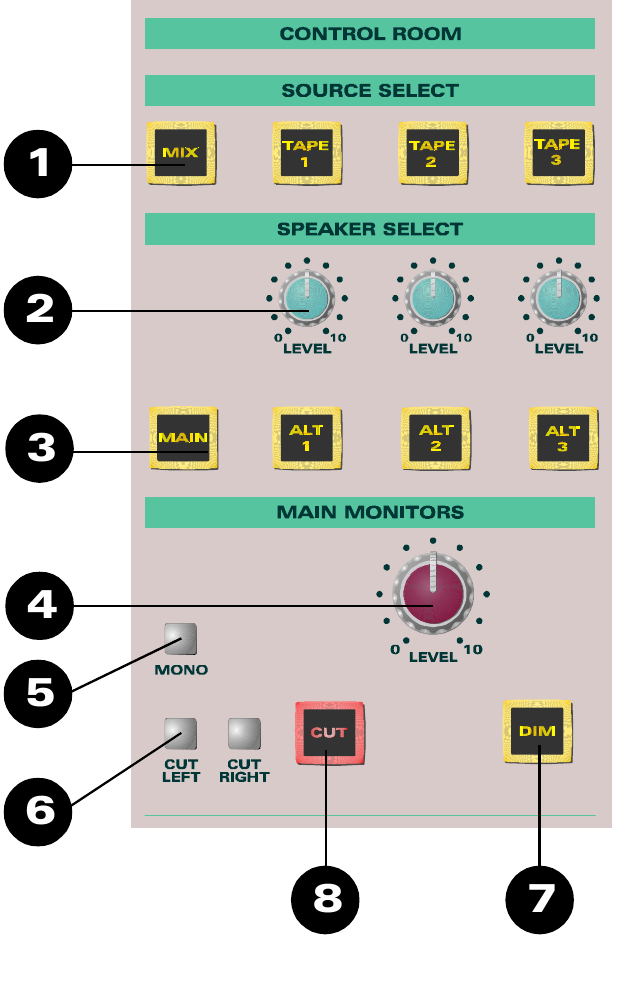
The ASP8024 provides for four pairs of loudspeakers: a MAIN pair and ALTERNATE 1, 2 and 3. Source selection is made from MIX or TAPE 1, 2 and 3.
Each loudspeaker pair has an independent level control. The main-monitor section also provides:
- MONO for checking mono compatibility.
- Separate CUT LEFT and CUT RIGHT controls.
- A master CUT to silence the monitoring output.
- DIM, which reduces the monitor level by 15 dB.
Oscillator and Solo
Oscillator
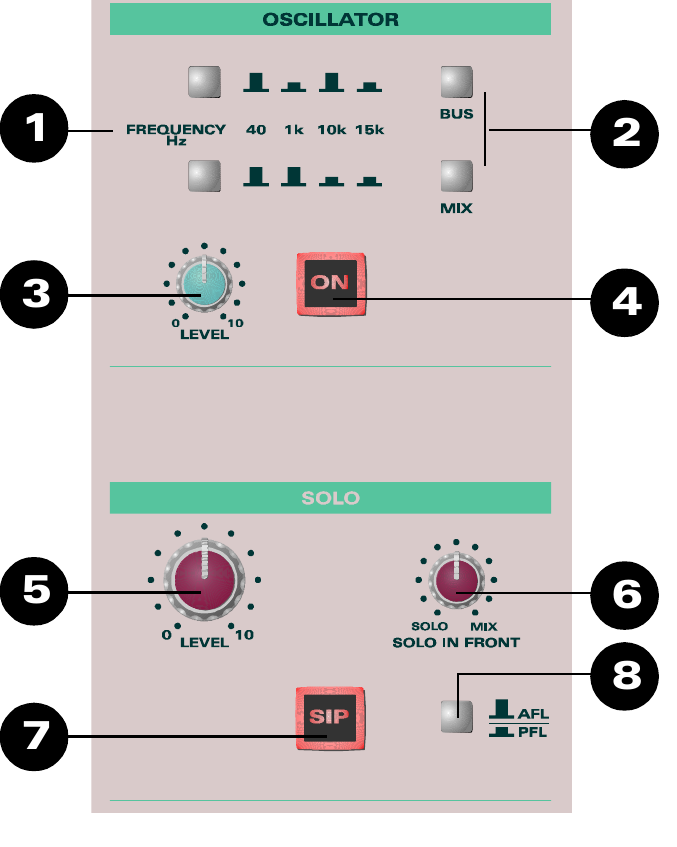
The four-frequency oscillator can be assigned directly to either the group buses or the stereo mix bus. Its level is adjustable. Frequencies of 40 Hz, 1 kHz, 10 kHz or 15 kHz can be selected.
During normal console operation, make sure the oscillator is switched OFF.
Solo master
The Solo master section controls the AFL/PFL and Solo In Place (SIP) systems.
- PFL auditions the pre-fade signal on the monitors and master meters.
- AFL auditions the post-fade, post-pan signal on the monitors and master meters.
- SOLO IN FRONT adjusts the balance between the solo signal and the stereo mix, allowing the selected signal to be heard either in isolation or with some of the mix behind it.
- SIP places the post-pan signal from soloed channels onto the console stereo output while muting the normal stereo mix for the duration of the solo.
- The PFL/AFL selector has no effect while SIP is active.
SIP acts on the console's stereo output. Do not use Solo In Place while that output is being recorded or otherwise relied upon as the programme mix, because the solo action will appear at the output.
Compressor
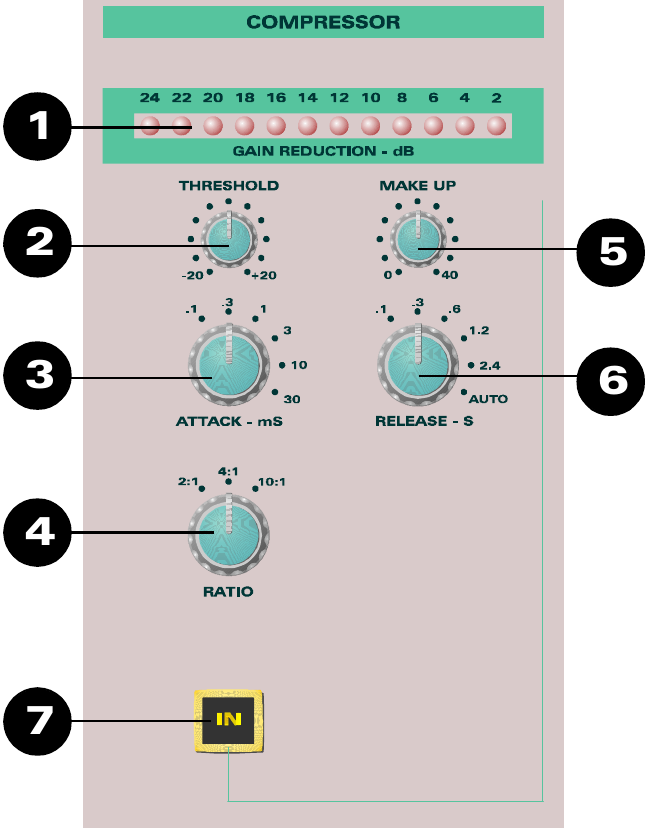
The stereo compressor can be switched into the main stereo signal path when required. It is located after the Mix insert point and before the Master Fader. It is intended for mix processing, with the principal parameters remaining under the engineer's control.
- Gain-reduction meter — a 12-segment bargraph showing the amount of compression being applied.
- THRESHOLD — sets the level at which compression starts, from -20 dBu to +20 dBu.
- ATTACK — sets how quickly the compressor responds, in six steps from 0.1 ms to 30 ms.
- RATIO — selects 2:1, 4:1 or 10:1. At 2:1, for example, a 2 dB rise at the input above threshold produces approximately a 1 dB rise at the output.
- MAKE UP — restores level after gain reduction. Up to 40 dB of make-up gain is available; the signal's dynamic range remains reduced even when its peak level is restored.
- RELEASE — sets how quickly gain returns to normal after the signal falls below threshold. Five stepped times from 0.1 s to 2.4 s are provided, plus AUTO.
- IN — switches the compressor into circuit.
The original manual specifically cautions against excessive compression and recommends judging the result by listening rather than by meter activity alone.
It also describes two practical approaches:
- Gain riding: manually moving the Master Fader can sometimes produce a more natural result because the engineer can anticipate musical peaks and adjust level progressively.
- Peak limiting: a relatively high threshold with a high ratio can be used to restrain peaks once the threshold is reached.
Stereo inputs

The stereo inputs allow effect returns and other stereo signals to be brought into the console without using a complete channel strip. Unlike simple stereo returns, they can be routed both to the stereo mix and back to the multitrack buses, so effects can be recorded if required.
They can also feed Foldback A and Foldback B, allowing performers to hear reverberation or other returned effects.
- ROUTING — sends the stereo input to multitrack buses 1–12.
- SHIFT — changes the routing switches to buses 13–24.
- F/B A — feeds Foldback A.
- F/B B — feeds Foldback B.
- TRIM — provides ±20 dB of input-level adjustment.
- LEVEL — rotary fader for the stereo input.
- MIX — sends the stereo input to the stereo mix bus.
- SOLO — auditions the stereo input according to the selected solo mode.
- CUT — mutes the input and can be used to remove its noise contribution when the return is not required.
On a 36-channel console, the two signal paths per channel provide 72 inputs. The four stereo inputs increase the available mix inputs to 80.
Subgroup outputs and faders

The first eight groups also feed eight subgroup outputs. Each subgroup has PAN, MIX, SOLO and CUT controls, plus its own fader. The subgroup outputs are available directly at the rear of the console and can also be assigned to the stereo mix.
The subgroups have rear-panel insert points for external processing. Their Insert Returns can also be used as additional inputs to the stereo mix.
- PAN positions the subgroup across the stereo bus.
- MIX assigns the subgroup to the stereo mix bus.
- SOLO auditions the subgroup according to the selected solo mode.
- CUT mutes the subgroup output.
The subgroup fader provides +10 dB of gain at the top, with 0 dB as the normal operating position. At the bottom of its travel the signal path is closed.
Talkback
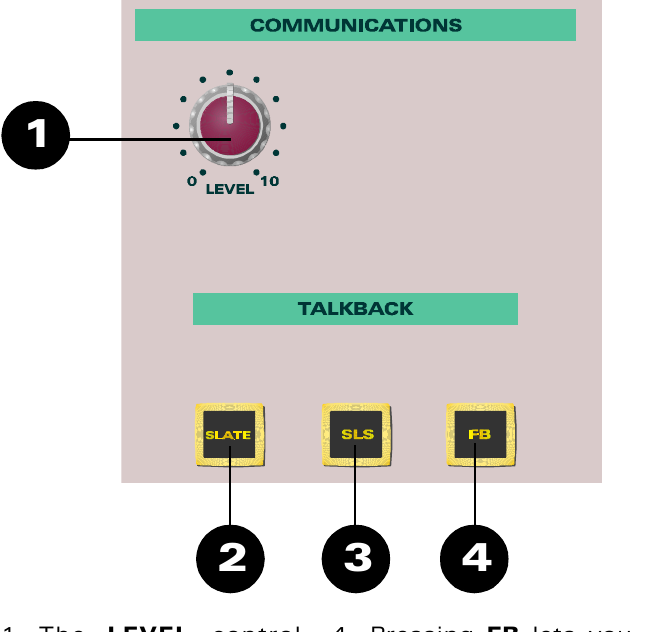
Talkback is used to communicate with the Studio, Foldback system or Group outputs. Talkback to the Foldback system works even when the Foldback level controls are turned down.
- LEVEL — adjusts the talkback level.
- SLATE — routes talkback to the group outputs, allowing track-identification information to be recorded.
- SLS — routes talkback to the Studio Loudspeaker.
- FB — routes talkback to the Foldback outputs.
Pressing any talkback key causes the control-room monitors to dim. This helps prevent feedback and improves talkback intelligibility, while leaving the console outputs unaffected.
The original manual states that the talkback microphone can be phantom powered by fitting Link 1 on the PC10801 board. This requires access to internal console hardware. Do not open or alter the console solely to change this setting unless you are competent to carry out the procedure; if in doubt, contact Audient Support or an experienced Audient console technician.
Auxiliary masters
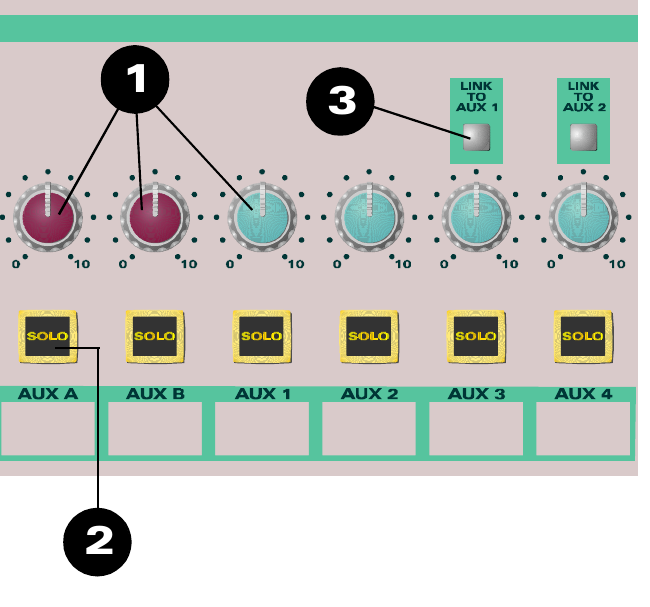
The Auxiliary Masters control the overall level of the auxiliary outputs. A balance can therefore be created with the individual channel sends and the complete auxiliary mix then adjusted with its master control.
Each auxiliary output can be SOLOed, and Auxiliary Master SOLO is always AFL.
Linking auxiliaries allows signals from the LF and SF paths to feed the same external effect device even though an individual auxiliary send can only be assigned to one path at a time.
The link combinations are:
- AUX 3 and AUX 5 → AUX 1
- AUX 4 and AUX 6 → AUX 2
- AUX 9 and AUX 11 → AUX 7
- AUX 10 and AUX 12 → AUX 8
When auxiliaries are linked, the leftmost auxiliary becomes the overall master. For example, if AUX 3 is linked to AUX 1, use the AUX 1 output as the master output.
Source note: page 36 of the original 8.21 manual prints “AUXs 10 and 11 can be linked to AUX 8”. This web edition uses AUX 10 and AUX 12, following the console's odd/even paired link structure: 9/11 feed 7 and 10/12 feed 8.
Bus Master Trim
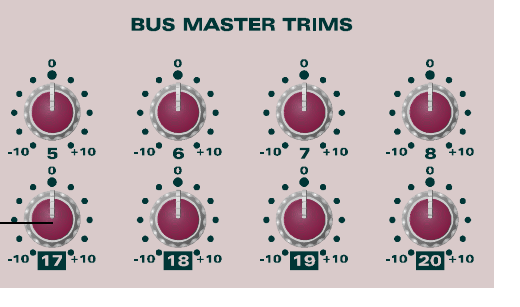
The Bus Master Trims are the final stage of level control over signals routed to the group outputs. Each group has its own bus trim, with a range of ±10 dB.
Changing a Bus Master Trim changes the overall level of that group output without disturbing the relative balance of the channels feeding it.
Master Fader
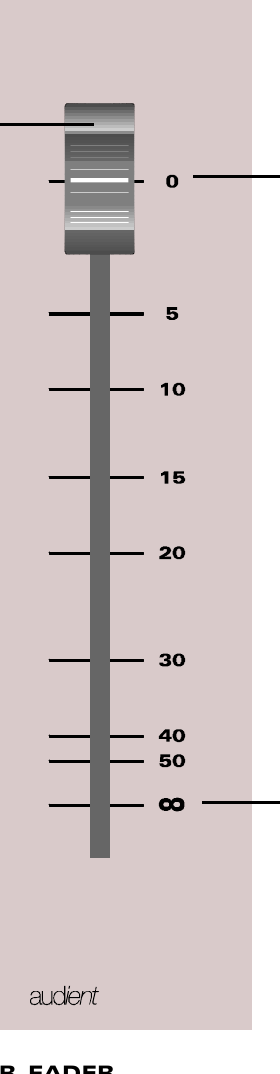
The Master Fader controls the stereo output. Unlike the channel faders, its 0 dB position is at the top of the travel because its primary purpose is to create a fade-out at the end of a mix.
Under normal operating conditions the fader should be fully open at 0 dB. If it needs to be pulled back significantly, the original manual advises that the levels feeding the mix bus are too high and should be reduced earlier in the signal path.
At the bottom of the fader travel the signal path is closed and no signal passes.