Software Mixer and Channel Features
The iD Software Mixer creates low-latency monitor and cue mixes. Its faders control monitoring levels; they do not normally change the raw signal recorded by the DAW.
Channel types
The mixer can display:
- Mic/Line 1–2 - the two analogue hardware inputs.
- Digital inputs - ADAT or S/PDIF channels, depending on the selected optical format and sample rate.
- DAW returns - six playback channels returned from the computer for monitoring, cue-mix creation and routing to hardware/outboard paths.
Channel controls
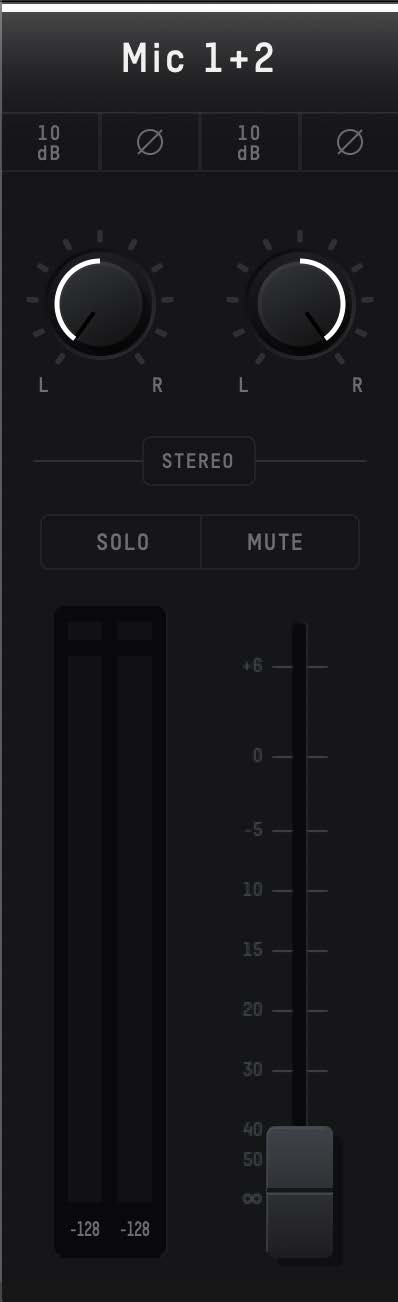
Channel name
Rename a channel to make a session easier to navigate.
+10 dB digital boost
The +10 dB control is a post-ADC/digital channel boost. It can raise the signal presented from that input channel, including the signal made available to the computer, but it is not an extra 10 dB of analogue mic-preamp gain. The analogue mic/DI gain range remains 58 dB.
Polarity invert
The polarity control inverts the channel polarity. This can be useful when checking multi-microphone or multi-source phase relationships.
Pan
Pan places a mono channel between the left and right sides of the current monitor/cue mix.
Stereo linking
Adjacent compatible channels can be stereo linked. When linked, the pair is controlled by a single fader and its pans are set hard left and hard right.
Solo and mute
- Solo isolates the selected channel(s) in the current monitor mix; multiple channels can be soloed together.
- Mute removes a channel from that monitor mix.
Fader and meter
The fader controls the channel level in the selected iD monitor/cue mix from -∞ to +6 dB. Channel meters are shown in dBFS; exceeding 0 dBFS lights the red peak indicator. Click an indicator to clear it, or use Alt/Option + click to clear all clip indicators.
Recording-level changes are made with the hardware/preamp controls and other recording-path controls. A low-latency monitor fader can be turned down without reducing the level recorded in the DAW.
Continue to Master Section.