Oscillator, Solo and Compressor
Oscillator
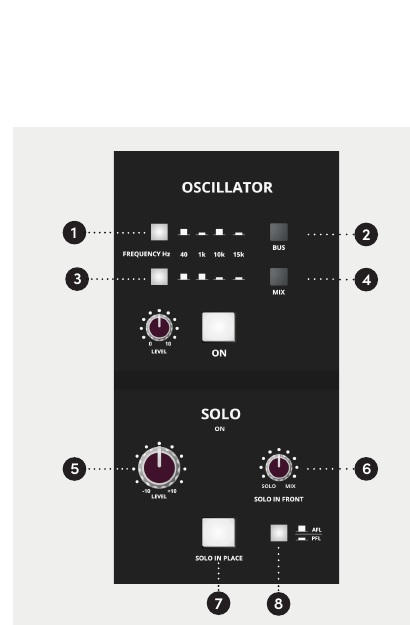
The built-in oscillator provides reference tones for system alignment and signal-path checking.
| Control | Function |
|---|---|
| Frequency | Selects 40 Hz, 1 kHz, 10 kHz or 15 kHz |
| BUS | Routes the oscillator to record buses 1–16 |
| MIX | Routes the oscillator to the stereo Mix bus |
| LEVEL | Adjusts oscillator level |
| ON | Enables the oscillator |
caution
Ensure the oscillator is switched OFF during normal operation.
Solo
- PFL — Pre-Fade Listen: auditions the pre-fader signal.
- AFL — After-Fade Listen: auditions the post-fader, post-pan signal.
- SOLO IN FRONT: adjusts the balance between the solo signal and the stereo mix.
- SIP — Solo in Place: places the post-pan signal from the soloed channel(s) onto the stereo Mix output while muting the other Mix signals. The PFL/AFL selector has no effect while SIP is active.
- SOLO ON: illuminates whenever a console solo is active.
Solo in Place affects the stereo Mix output
If the ASP4816-SE stereo Mix output is being recorded, the use of SIP will be captured in that recording. Do not use SIP while recording or printing the stereo Mix unless this behaviour is intended.
Stereo VCA bus compressor
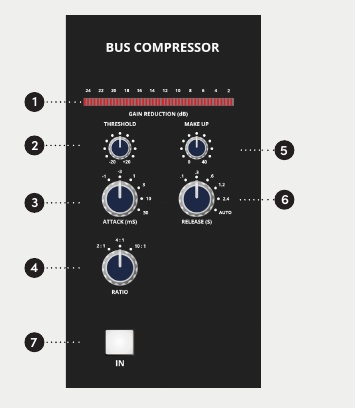
The onboard stereo bus compressor is positioned after the Mix Insert and before the Master Fader.
| Parameter | Range / settings |
|---|---|
| Gain-reduction meter | 12 segments |
| Threshold | −20 to +20 dBu |
| Attack | 0.1, 0.3, 1, 3, 10, 30 ms |
| Ratio | 2:1, 4:1, 10:1 |
| Makeup Gain | 0–40 dB |
| Release | 0.1, 0.3, 0.6, 1.2, 2.4 s, Auto |
| IN | Inserts the compressor into the stereo Mix path |
For stronger peak control, select a higher ratio such as 10:1 and set the threshold so that compression acts primarily on the required peaks. Use the gain-reduction meter to monitor the amount of processing being applied.