Fader Paths, Flip and Pan
Short Fader (SF)
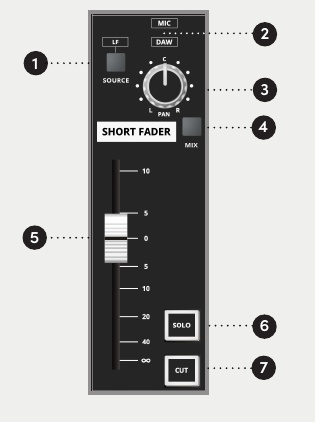
Three backlit source indicators show whether the SF path is receiving Mic/Line, DAW or LF.
| Control | Function |
|---|---|
| SOURCE | Selects the LF path as the SF source, overriding Mic/Line or DAW |
| PAN | Positions the SF signal across selected odd/even record buses |
| MIX | Routes the SF path to the stereo Mix bus |
| Short Fader | Controls SF level, with up to +10 dB gain above unity |
| SOLO | Auditions the SF path using the selected solo mode |
| CUT | Mutes the SF path |
By default, SOURCE takes the LF signal post-fader. It can be changed to a pre-fader source using an internal hardware link. Contact Audient Support before changing this configuration.
The SOURCE selection occurs before the EQ, so EQ sections moved to SF can process an LF-derived SF signal.
FLIP and LF pan
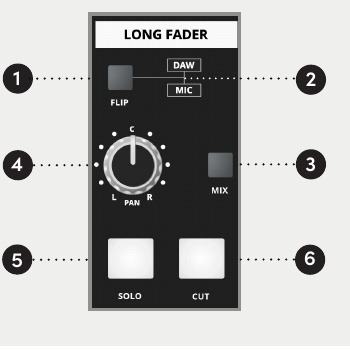
FLIP swaps the Mic/Line and DAW sources between the SF and LF paths. The LF PAN control positions the LF signal across the stereo Mix bus.
| FLIP | SF path | LF path |
|---|---|---|
| Released | Mic/Line | DAW |
| Pressed | DAW | Mic/Line |
Long Fader (LF)
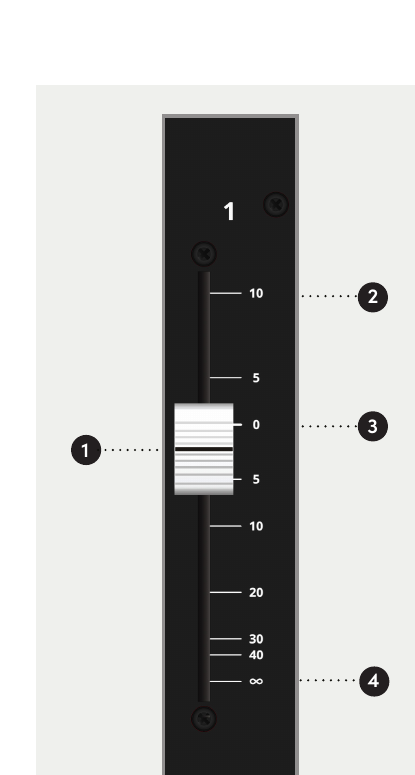
The Long Fader controls the LF path and is primarily used for monitoring and final mix level.
| Position | Function |
|---|---|
| +10 dB | Maximum fader gain |
| 0 dB | Unity gain / normal reference position |
| ∞ | Maximum attenuation |
When setting levels, begin with the Long Fader at 0 dB and adjust the appropriate upstream gain or trim control to establish the required operating level.