Input Pod
Each main channel provides three input sources: a mutually exclusive Mic or Line input, plus a DAW input.
In the normal signal-path assignment, the Mic/Line source feeds the SF path and the DAW source feeds the LF path. FLIP reverses those assignments.
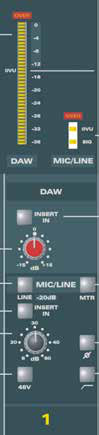
Controls
- 20-segment meter - normally displays the DAW input.
- 3-segment meter - normally indicates the Mic/Line level.
- DAW INSERT IN - places the DAW insert return into the DAW path.
- DAW TRIM - adjusts DAW input level by +/-15 dB.
- MIC/LINE - selects the Line input when pressed; Mic is selected when released.
- MTR - swaps the normal meter assignments so the Mic/Line input appears on the 20-segment meter and the DAW input on the 3-segment meter.
- Mic/Line INSERT IN - places the Mic/Line insert return into circuit.
- Mic/Line GAIN - Mic range +6 to +60 dB; Line range -14 to +40 dB.
- Polarity reverse - reverses signal polarity.
- 48 V - enables phantom power for the microphone input.
- High-pass filter - removes unwanted low-frequency content such as rumble.
warning
Turn the monitoring level down before switching 48 V phantom power on or off.
Both the Mic/Line and DAW paths have dedicated insert send and return connections. See Long Fader and Input Connections for the channel connector panel.