Digital I/O and clocking
ORIA provides digital audio connections for receiving multichannel audio and feeding speakers with AES/EBU inputs.
Correct clock configuration is essential when connecting ORIA to other digital audio equipment.
Digital I/O
ORIA provides:
- 16 AES output channels through a single DB25 connector
- Two ADAT optical inputs
The available ADAT input channel count depends on the sample rate:
| Sample rate | Total ADAT input channels |
|---|---|
| 44.1 or 48 kHz | 16 |
| 88.2 or 96 kHz | 8 using SMUX |
The AES outputs and analogue Surround Outputs cannot be used at the same time.
AES outputs
ORIA’s DB25 connector provides 16 channels of AES digital audio as eight AES data streams.
Each XLR connection in an eight-way breakout carries two audio channels.
ORIA uses a standard TASCAM pinout for its AES DB25 output.
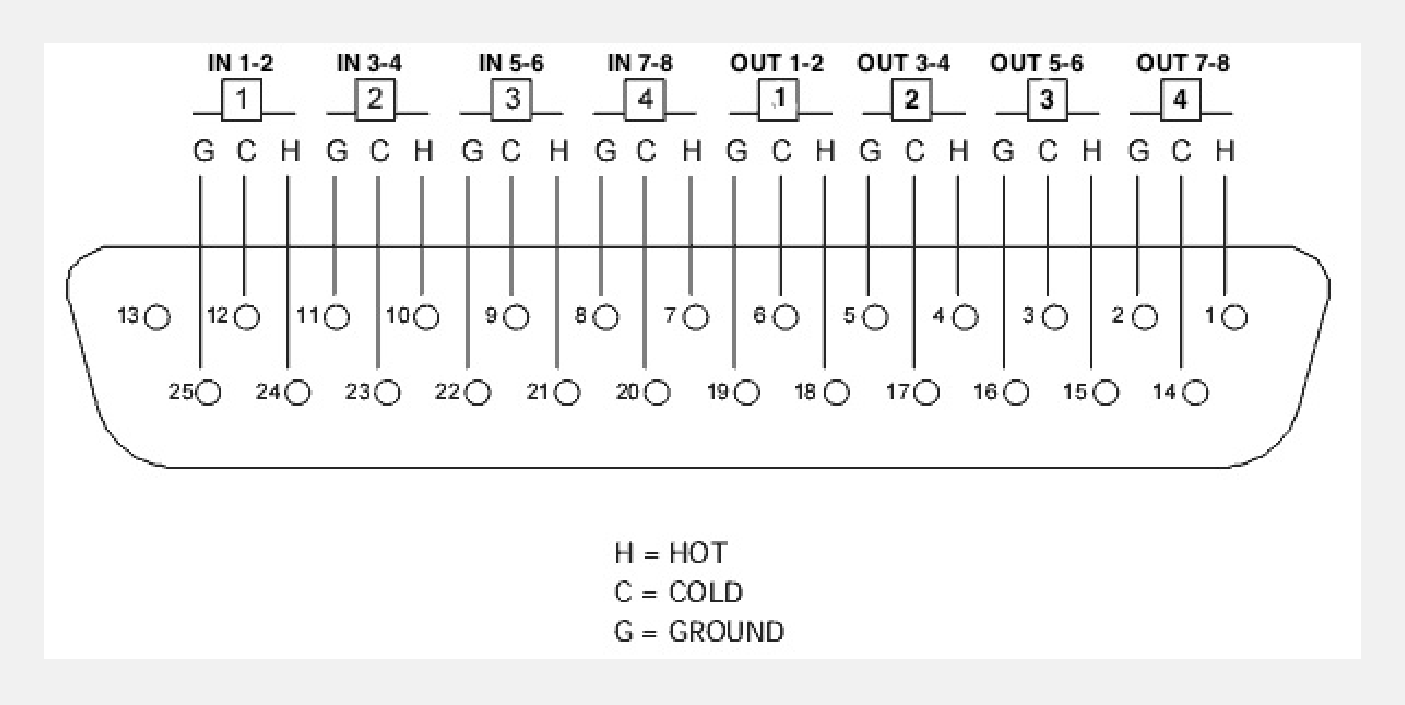
For the best results, use a TASCAM-pinout DB25 to eight-XLR loom designed for 110 Ω AES/EBU signals.
A standard analogue DB25 to eight-XLR loom can also be used to break out the connector. The breakout can then be connected to the monitors using 110 Ω AES XLR cables.
ADAT inputs
The two optical TOSLINK inputs can receive multichannel ADAT audio from equipment such as an external audio interface or microphone preamp.
At 44.1 or 48 kHz, each optical input can receive eight channels.
At 88.2 or 96 kHz, each input receives four channels using SMUX.
ORIA does not have ADAT outputs. It can receive clock through an incoming ADAT signal, but it cannot send clock to another device through ADAT.
Understanding digital clocking
Every device in a connected digital system must operate from the same clock.
One device acts as the Controller, providing the clock signal. All other devices operate as Peripherals and synchronise to that signal.
These terms replace the traditional master and slave terminology.
Only one device should act as the clock Controller.
Using more than one Controller can cause clicks, pops or other digital audio errors.
Using ORIA as the clock controller
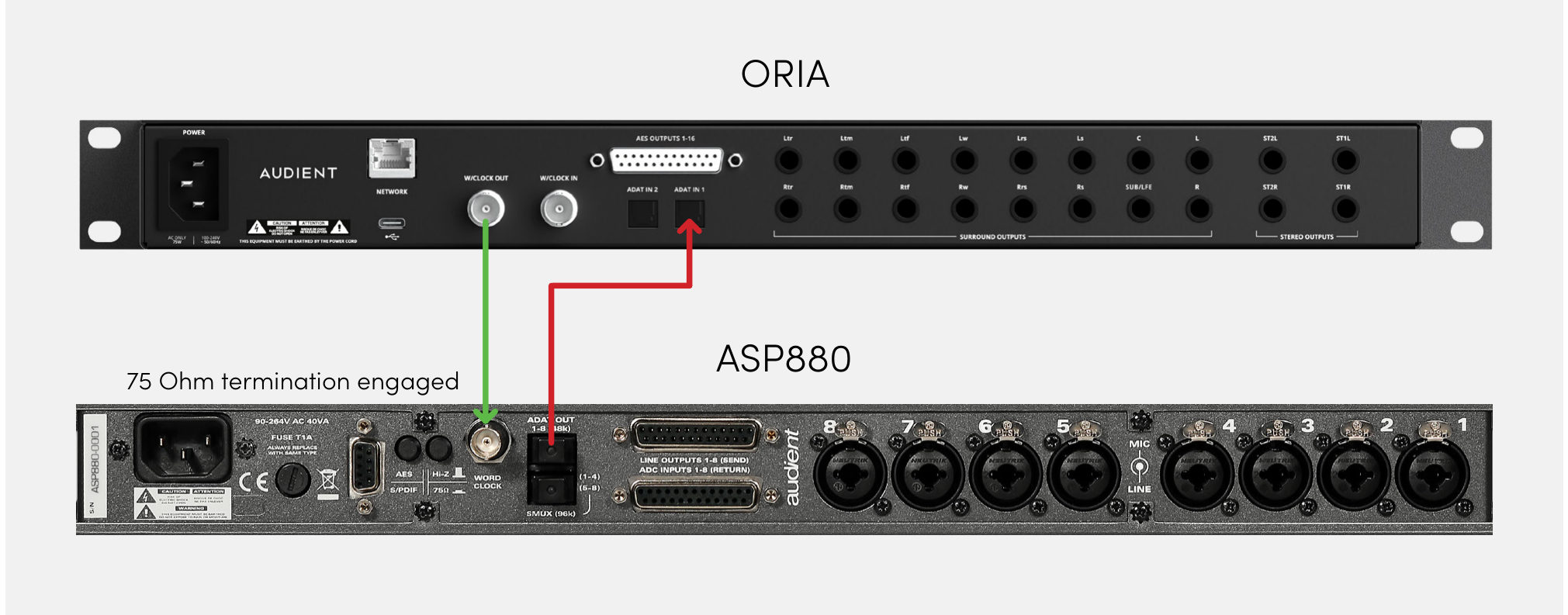
When ORIA is the Controller, send its clock signal to the other equipment through the Word Clock Output.
Connecting one device
- Connect ORIA’s Word Clock Output to the external device’s Word Clock Input using a 75 Ω BNC word-clock cable.
- Configure the external device to receive clock through its Word Clock Input.
- Enable 75 Ω termination on the external device.
Connecting multiple devices
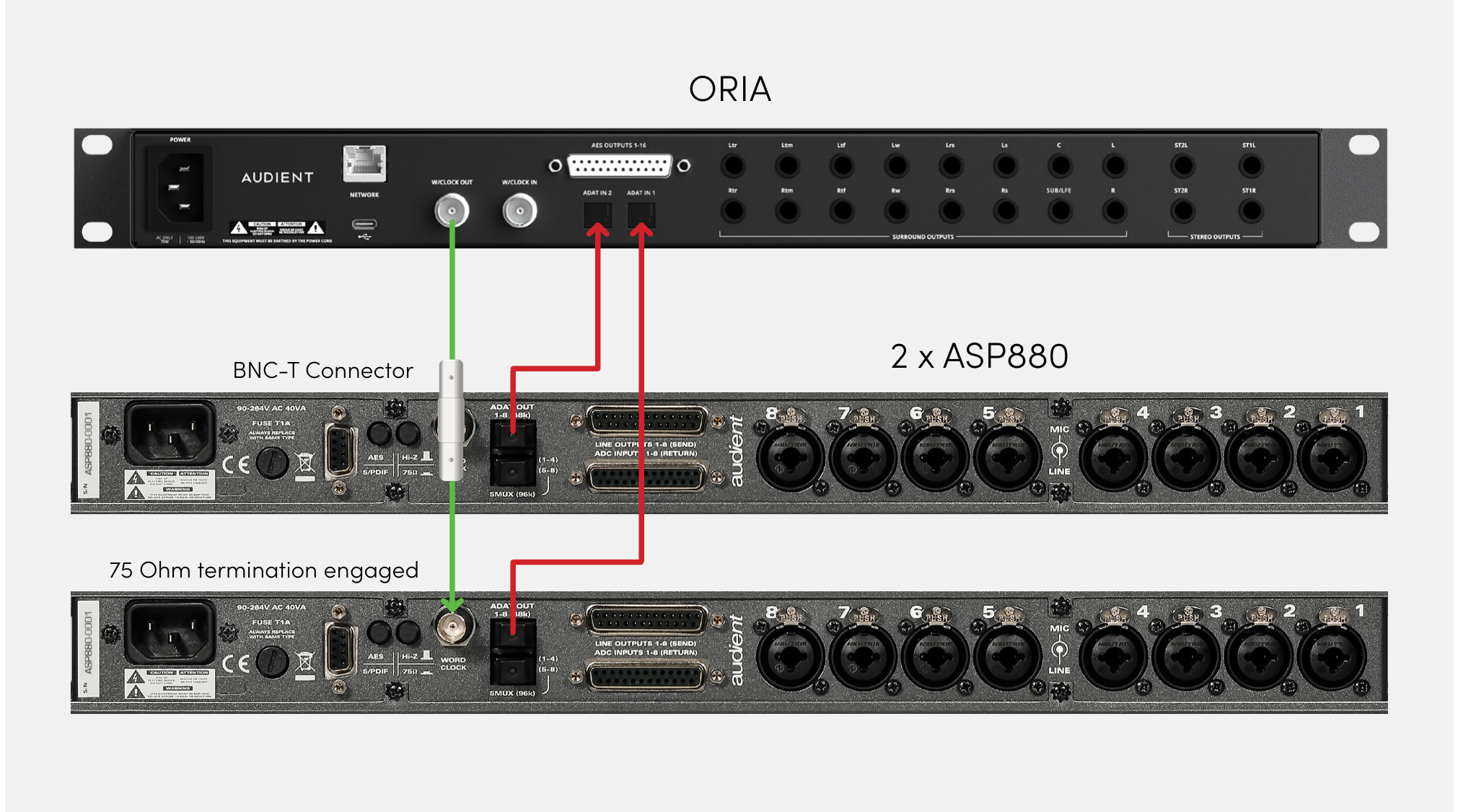
Use BNC T-connectors when distributing ORIA’s clock to multiple devices.
Only the final device in the chain should have its 75 Ω termination enabled. Termination must be disabled on the preceding devices.
Refer to the external equipment’s documentation for its termination controls.
Using ORIA as a clock peripheral
ORIA can receive an external clock through:
- An incoming ADAT signal
- The BNC Word Clock Input
Receiving clock through ADAT
- Connect the external device’s ADAT output to one of ORIA’s ADAT inputs.
- Set the external device to provide the system clock.
- Open ORIA Control.
- Open the System Panel.
- Set Preferred Clock Source to ADAT.
- Check that the clock-source indicator is green.
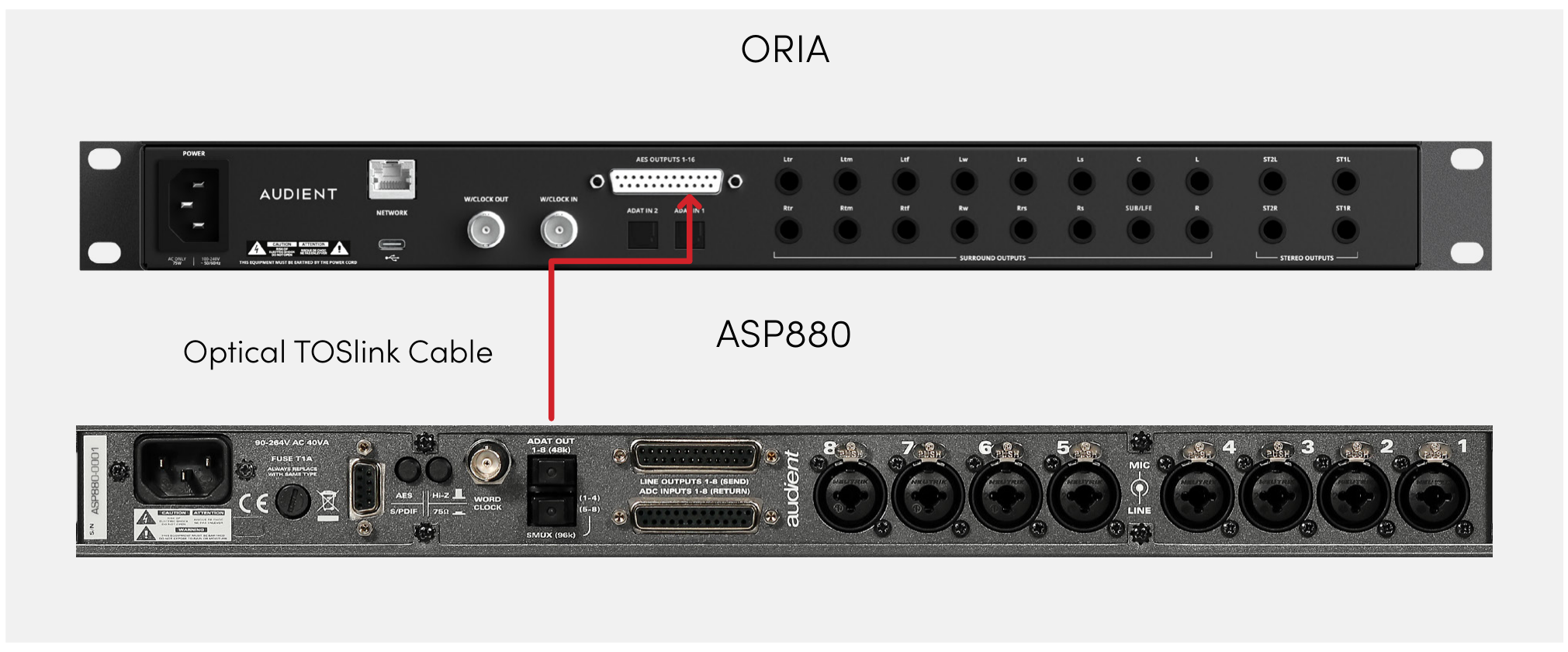
Because ORIA has no ADAT outputs, it cannot provide an ADAT clock to the external device. Use ORIA’s BNC Word Clock Output when ORIA must act as the Controller.
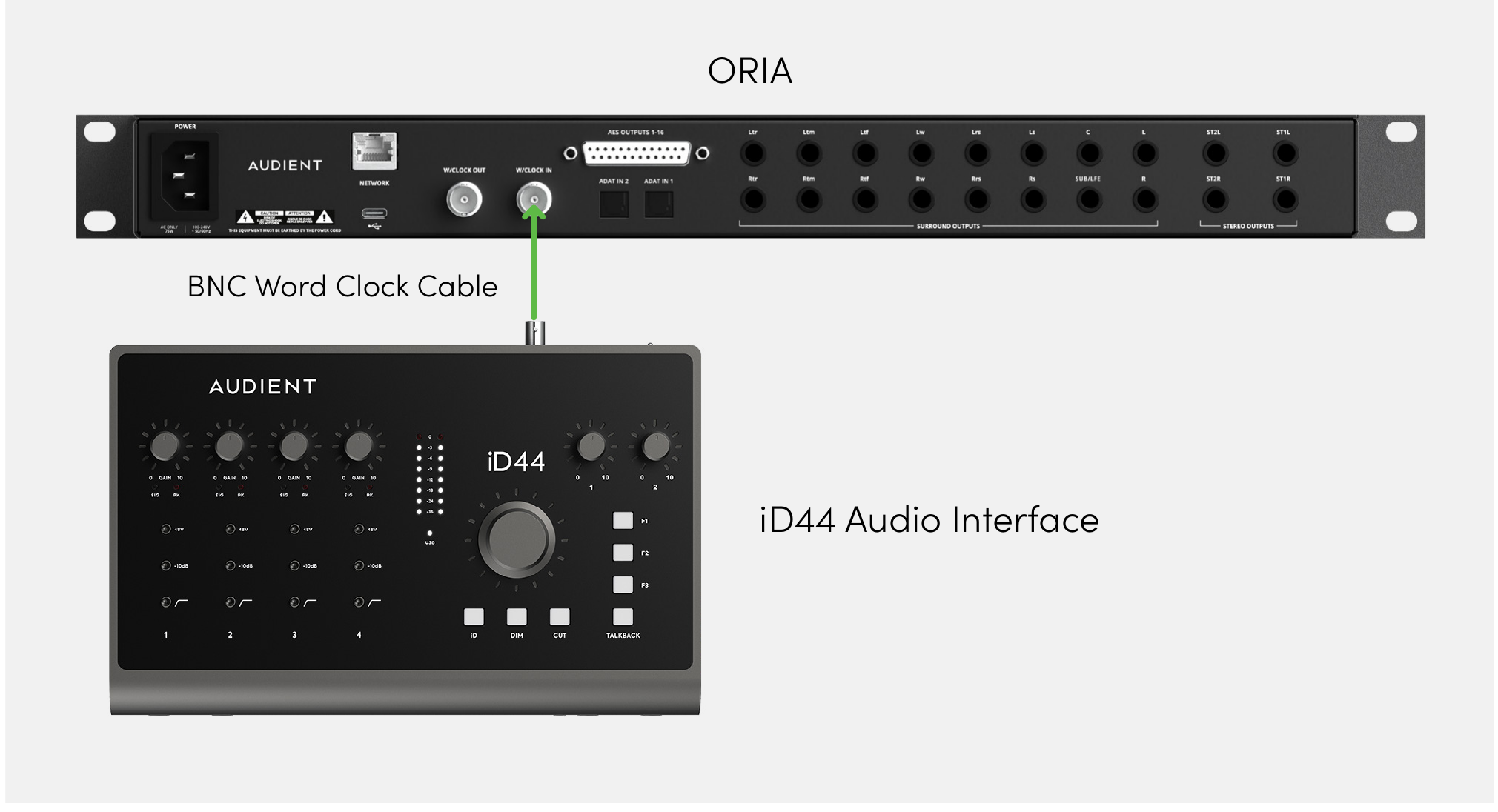
Receiving clock through BNC
- Connect the external device’s Word Clock Output to ORIA’s Word Clock Input using a 75 Ω BNC word-clock cable.
- Set the external device to provide the system clock.
- Open ORIA Control.
- Open the System Panel.
- Select the BNC Word Clock Input as ORIA’s preferred clock source.
- Check that the clock-source indicator is green.
Checking clock status
The clock-source indicators in ORIA Control and the front-panel Status screen use the following colours:
- Green — ORIA is successfully synchronised to the source.
- Amber — A clock signal is present, but its sample rate does not match ORIA.
- Red — No clock signal has been detected.
When an indicator is amber, set all connected devices to the same sample rate.
When an indicator is red, check that the source device is switched on, the correct clock source is selected and the cable is connected securely.
Clock-source switching from ORIA Control requires ORIA Control 1.3.4 or later and ORIA firmware 1.1.4 or later.
Next steps
Continue to USB and Network Audio to connect ORIA by USB or configure the optional Dante network-audio card.