Faders and Channel Connectors
Short Fader path
The SF section normally carries the Mic/Line input, or the DAW input when FLIP is engaged.
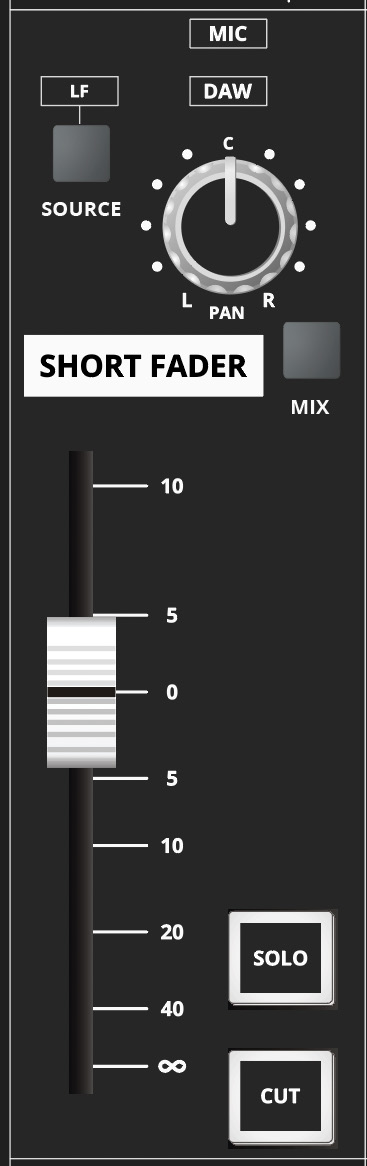
The SF section provides:
- Backlit MIC/DAW source indication.
- SOURCE selection for taking the LF signal into the SF path.
- PAN for odd/even bus routing.
- MIX assignment to the stereo Mix bus.
- Short Fader with 10 dB of gain in hand.
- SOLO.
- CUT.
The LF source feeding SF is normally post-LF fader. This source selection occurs before the EQ allocation point, so EQ moved to SF can also process the LF-derived signal. An internal link can change the LF source to pre-fader; contact Audient Support if this configuration is required.
FLIP and LF pan
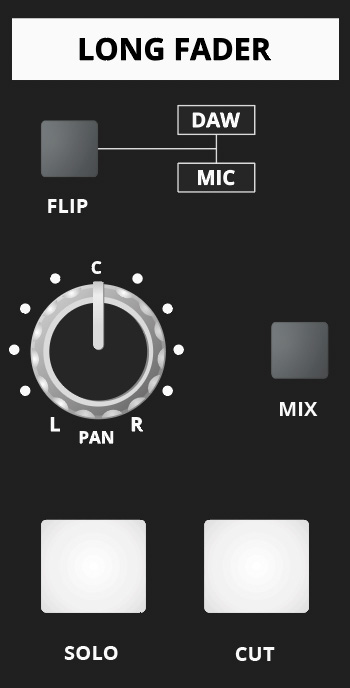
FLIP swaps the Mic/Line and DAW inputs between the SF and LF paths. The LF section also provides stereo Mix assignment, pan, solo and cut controls.
Long Fader

The Long Fader normally controls the DAW-return monitoring and final-mix path. It is intended to operate around the 0 dB mark and provides up to +10 dB of gain.
When establishing gain structure, begin around 0 dB and set the source/input level appropriately rather than relying on excessive fader gain.
Channel rear-panel connectors
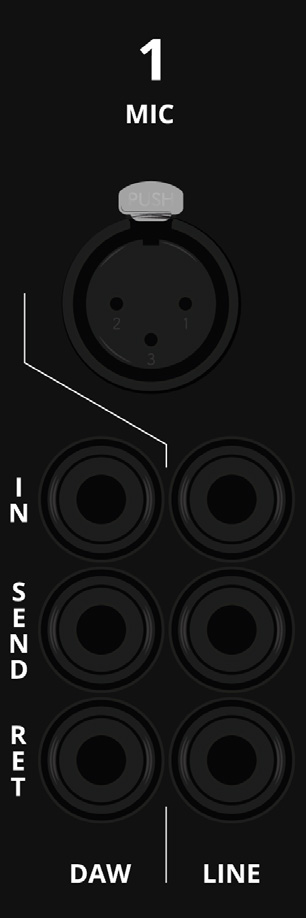
Each channel provides:
- Microphone input — XLR.
- Line input — TRS.
- Mic/Line Insert Send — always active and may also be used as an additional output.
- Mic/Line Insert Return.
- DAW input — TRS line-level input.
- DAW Insert Send — always active and may also be used as an additional output.
- DAW Insert Return.
The insert sends carry their respective source signals and are not changed by FLIP.
Continue to Studio, Foldback and Monitoring.