Input Pod
The input pod is the entry point for the channel's Mic/Line and DAW signals.
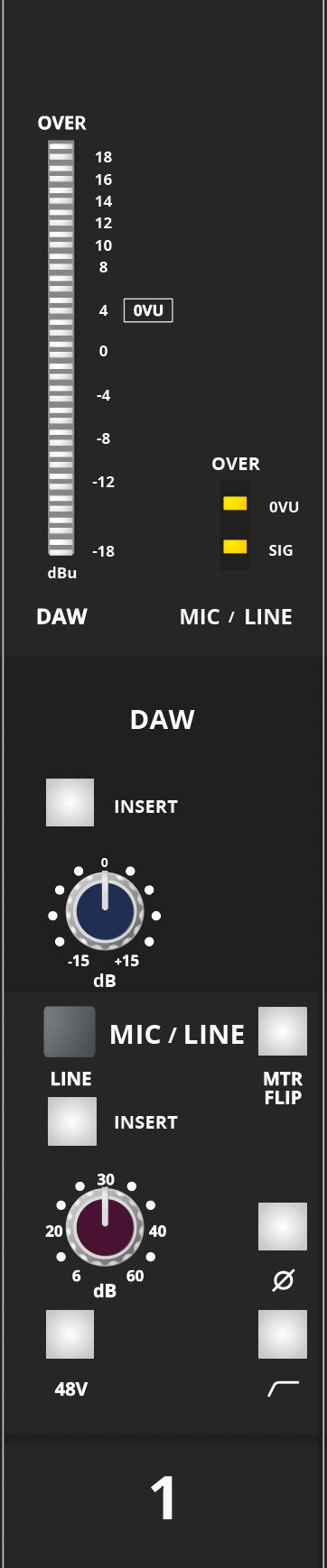
Inputs and normal signal paths
The channel provides:
- Microphone input
- Line input, selected in place of the microphone input
- DAW input
By default the Mic/Line source feeds the SF path and the DAW input feeds the LF path. FLIP reverses the two assignments.
Input controls
- 20-segment meter — normally displays the DAW input.
- 3-segment meter — normally displays the Mic/Line input.
- DAW INSERT IN — switches the DAW insert return into circuit.
- DAW TRIM — ±15 dB adjustment.
- MIC/LINE — press to select the Line input instead of Mic.
- MTR — swaps the DAW and Mic/Line meter assignments.
- Mic/Line INSERT IN — switches the Mic/Line insert return into circuit.
- Mic/Line GAIN.
- Ø polarity reverse.
- 48V phantom power.
- High-pass filter.
Gain ranges
- Mic input gain: +6 dB to +60 dB
- Line input gain: -14 dB to +40 dB
- DAW input trim: ±15 dB
caution
Turn down or mute loudspeaker and headphone monitoring before switching phantom power on or off. Switching 48 V can produce a loud transient.
The high-pass filter can be used to reduce unwanted low-frequency content such as rumble. The polarity switch reverses signal polarity where required for multi-microphone or source alignment.
Continue to Routing, Auxiliaries and EQ.