Control Room, Studio and Foldback
Control Room Monitoring
The Control Room Monitoring section selects what the engineer hears and routes it to the Main or alternate monitor outputs.
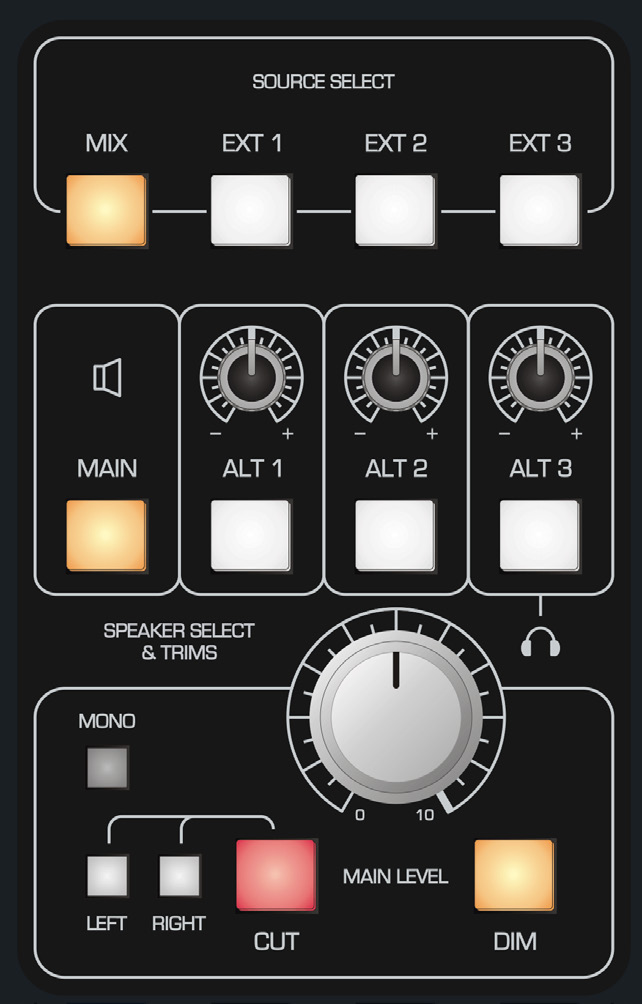
Source selection
The source-select buttons choose the audio monitored in the control room:
- MIX - stereo Mix Bus.
- EXT 1, EXT 2, EXT 3 - the three stereo External Inputs on the master connector panel.
Monitor destinations and level controls
- MAIN routes the selected source to the Main monitor output, normally the primary control-room monitors.
- ALT 1, ALT 2, ALT 3 route the selected source to alternate monitor outputs.
- The individual ALT 1–3 trim controls let you match the alternate monitor levels to the Main monitor system.
- MAIN LEVEL is the normal control-room listening-volume control for the selected monitor destination.
- Selecting ALT 3 also feeds the built-in reference headphone output in the Master Meter section.
Monitor checks and level reduction
- MONO sums the left and right monitor channels so mono compatibility can be checked.
- LEFT / RIGHT / CUT allow the left, right or both monitor channels to be muted for checking individual sides of the mix.
- DIM reduces the monitor level by a preset amount. DIM is also engaged automatically when talkback is used, helping to reduce feedback and make talkback easier to hear.
Use the Control Room level controls for normal listening-volume changes. The stereo Master Fader changes the actual Mix Output level and should normally remain at 0 dB.
Live Room and Foldback
The Studio Loudspeaker and Artist Foldback section routes selected console sources to performers independently of the engineer's normal monitor level.
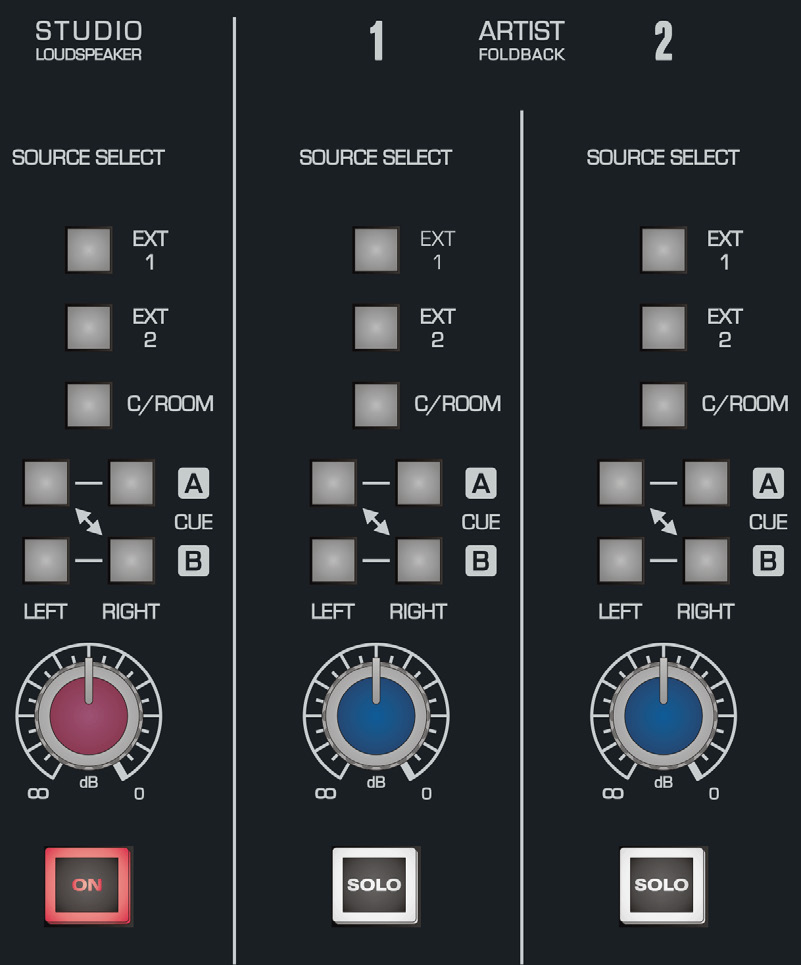
Source selection
The available source choices are:
- EXT 1 - External Input 1.
- EXT 2 - External Input 2.
- C/ROOM - the current Control Room output, allowing the performer to hear what the engineer is hearing.
- CUE A - Cue A bus.
- CUE B - Cue B bus.
Cue A and Cue B can be routed to the left or right sides of foldback, allowing mono or stereo artist mixes to be created.
Foldback level
The foldback level controls adjust each foldback output from off to 0 dB.
Studio loudspeaker
STUDIO LOUDSPEAKER ON switches the live-room Studio Loudspeaker output on or off. The rear Studio output is line level, so passive speakers require an appropriate amplifier.
Artist Foldback Solo
ARTIST FOLDBACK SOLO isolates the selected foldback source through the console solo system, while any other simultaneously soloed sources remain audible.
The two Foldback outputs are intended to feed line-level headphone distribution or similar performer-monitoring systems.
Continue to Communications, Metering and Solo.